A Confluence space is often hailed as the ultimate single source of truth. But what happens when you have multiple audiences, each requiring a customized experience to access that information? When a one-size-fits-all documentation isn't enough, you need a one-to-many documentation publishing strategy. Let’s explore how to make that happen in Confluence – with minimal effort.
What is "One-to-Many"?
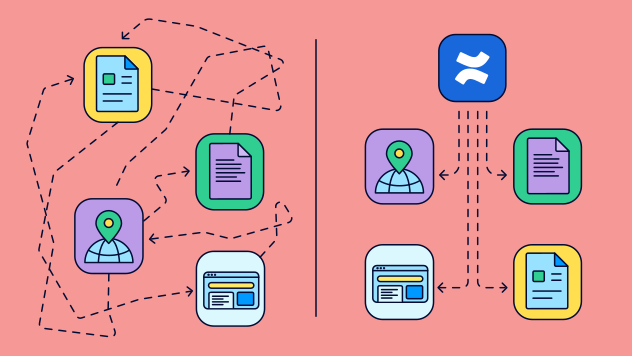
Borrowed from database architecture, one-to-many (often abbreviated as 1:M) describes a relationship where a single element connects to multiple others. Applied to content management, it means authoring your documentation centrally in a single Confluence space and pushing it – either in its entirety or in tailored sections – to multiple other spaces or websites where each receives a tailored version of the original content. Hence, multi-tenant documentation strategy.
Consider a scenario incredibly common in SaaS – you have a public documentation site, but a VIP Enterprise client demands their own custom portal, complete with their own design and custom domain.
Creating Client-Specific Documentation Portals
SaaS applications are inherently modular; customers mix and match the features they need. Because of this, demands for dedicated, fully custom documentation sites are incredibly common – especially in regulated industries like healthcare or emergency services, where surfacing irrelevant features can actually cause compliance issues.
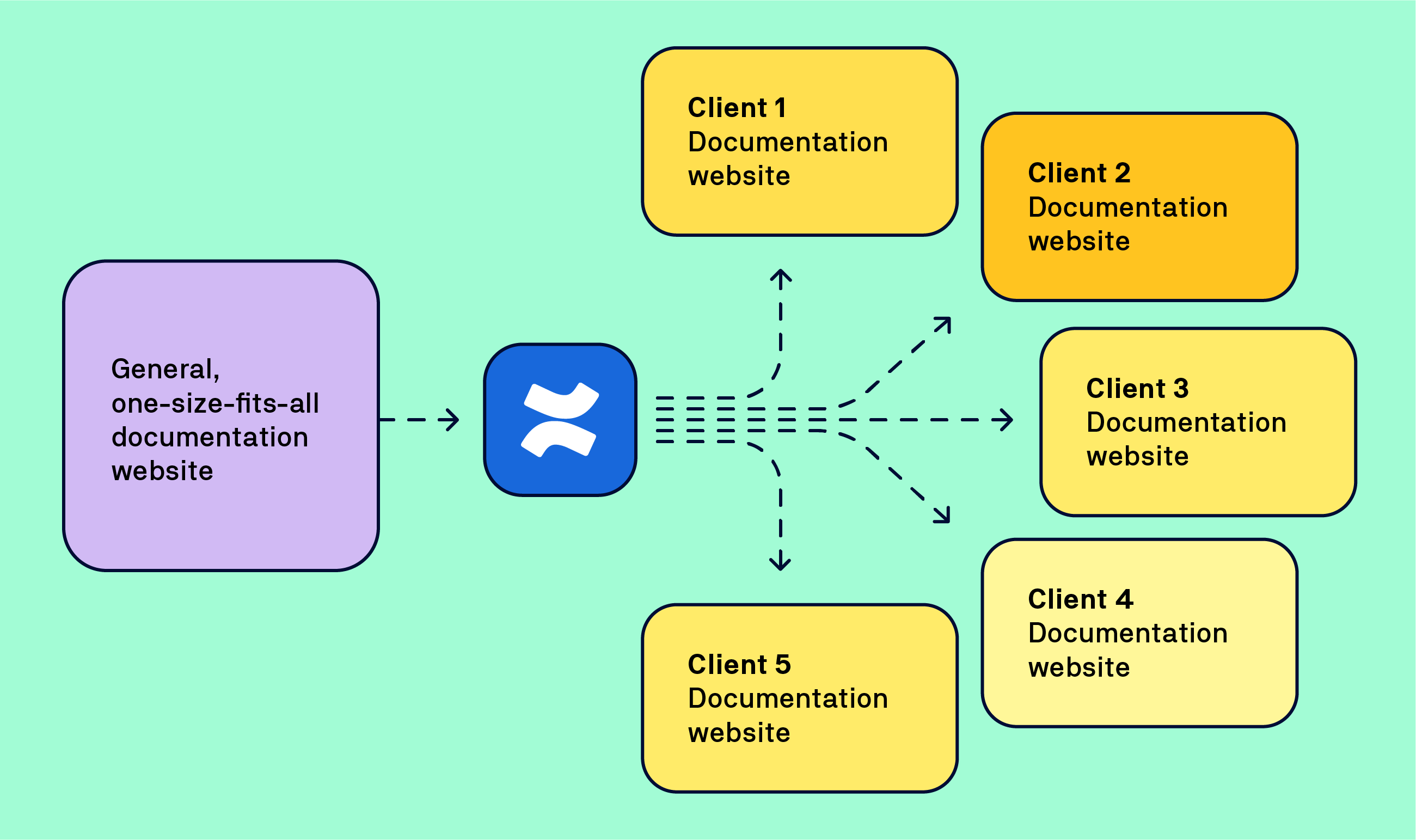
You will still provide a one-size-fits all documentation portal. A well maintained public knowledge base will boost your online presence, enable feature discovery, and will work perfectly for most of your clients. But some clients might demand a custom help site – driven by a well-defined need or out of sheer business vanity.
Demands vary but there are common traces:
-
Customer’s own branding
-
Customer’s own domain
-
Protected access
This might sound as an overkill but such demand might be perfectly logical especially if your client uses custom features or has early access to your latest updates.
The single-source advantage
One space to rule them all! Single-sourcing is the name of the game here. In other words, you want to author and manage the documentation’s entire life cycle from a single Confluence space, or a very tightly controlled space cluster. Why? Because maintaining two or more, nearly identical, documentation sources in parallel will require too much extra effort that documentation teams cannot afford.
The goal is to single-source everything and only then distribute content to specific sites per individual client’s needs.
Which brings us to the one-to-many concept for documentation publishing.
The essential Scroll apps
Frankly, multi-tenant documentation strategy is a nervous sweat-inducing scenario that almost always results in NO from information architects.
But it’s incredibly easy to achieve on Confluence with a little help of our Scroll platform apps:
-
Scroll Content Manager and its Variants determine how content behaves in Confluence.
-
Scroll Sites create documentation centers to which content is published from Confluence.
Model Scenario – Documentation Portal for a VIP Customer
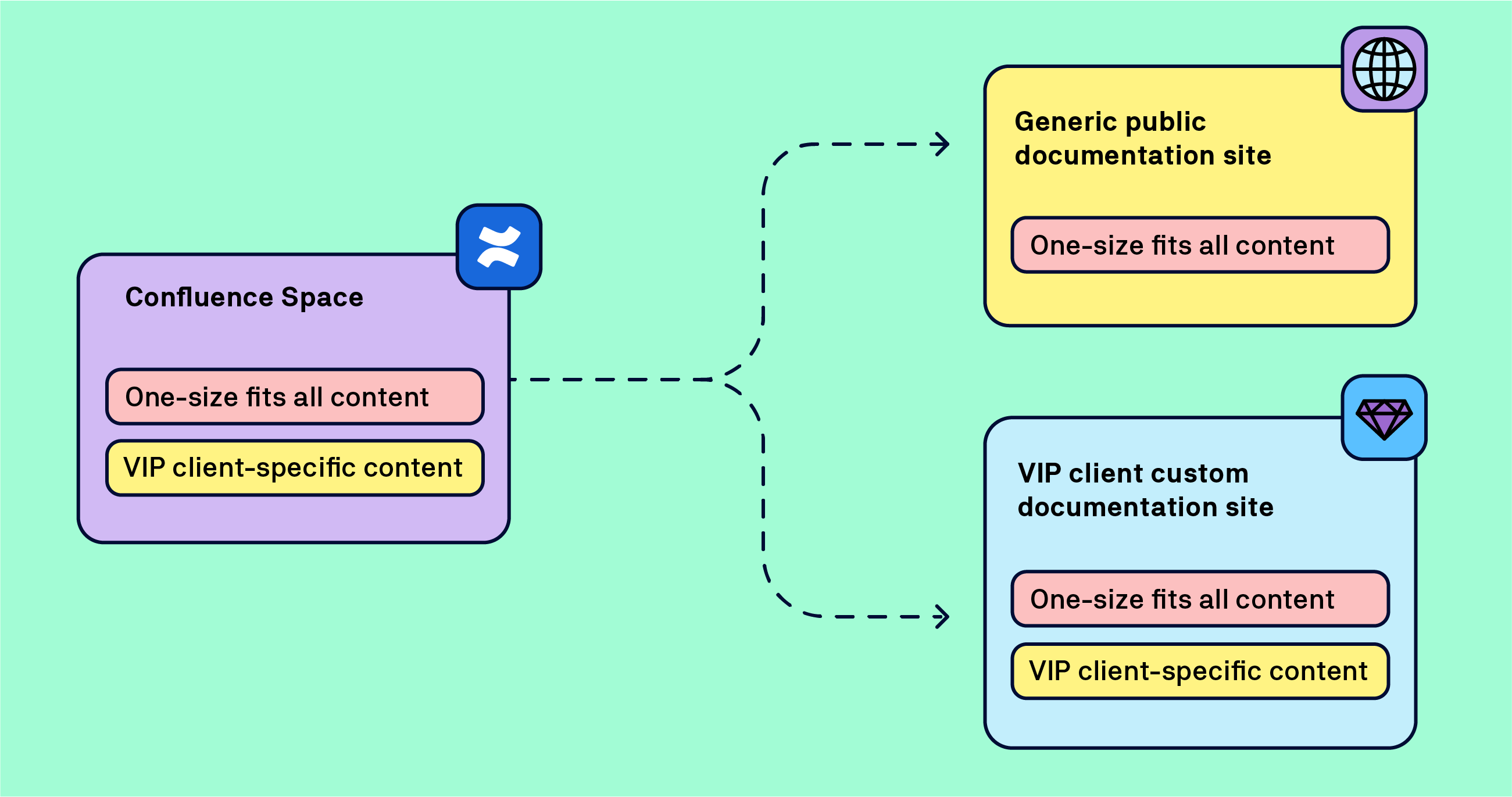
In this scenario, you have a VIP client. It’s a big brand and you’ve already developed a custom solution for them – obviously, neither you nor your client want to make the custom documentation visible to the general public. A dedicated documentation site, accessible only to the employees of your VIP client, is in the interest of both parties.
Your regular, public documentation site, will serve its original purpose. Your VIP client will gain a customized user experience. Your workflows and the volume of work will remain unchanged.
Let’s walk through the setup step-by-step and break down the seemingly crazy set of requirements into a walk in the park 🙂 .
Setting Up Conditional Content Rules in Confluence
Maintaining the single source of truth is crucial to keep the documentation tight – even in the expanded VIP portal. The setup starts in Confluence. A single space ensures that you don’t have to double your work and maintain two doc sets that are mostly identical.
You need to ensure two things:
-
Designate VIP-only content.
-
Set up rules that determine how the content is organized before it reaches the two documentation portals.
The benefits of conditional content variants
In information architecture, conditional content, also known as content variants, is an advanced technique of assigning properties to specific content sections to determine how content behaves and/or how it’s processed by other tools under specific conditions.
To learn more, see the Conditional Content and Why You Should Use It article on the Atlassian Community forum.
Natively, Confluence does not support conditional content, or variants, which is why we’re going to use Scroll Content Manager. The app uses Confluence labels as a basis for the conditional rules.
In our scenarios, we’re working with two variants:
-
general documentation variant – one-size-fits-all content
-
VIP documentation variant – one-size-fits-all content + special documentation for the VIP client
The conditions setup will be straightforward:
-
Pages with the
generallabel will be published to the general documentation portal. -
Pages with the
generalorviplabel will be published to the VIP documentation portal.
The following screenshot composite shows the actual variants' setups in Scroll Content Manager.
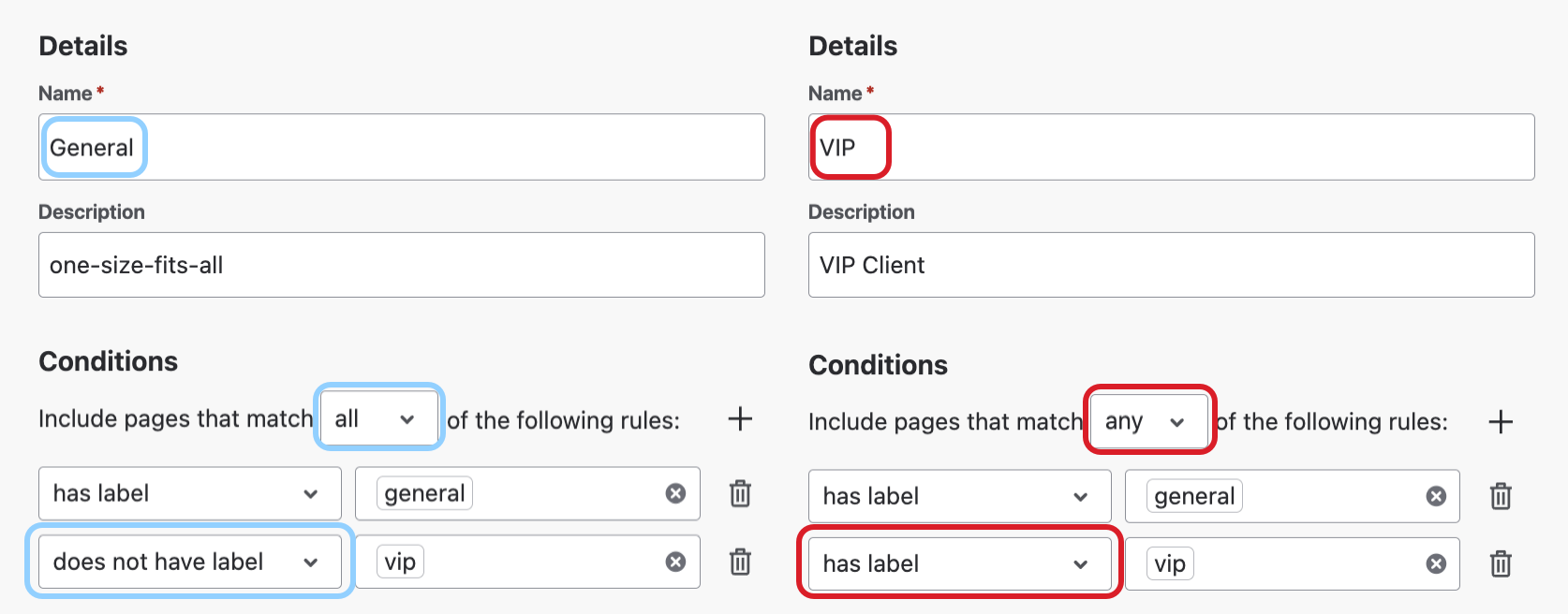
The rules' logic ensures that:
-
no page with the
viplabel will be published to the general documentation center by Scroll Sites. -
you don’t have to use both labels for VIP pages.
Prerequisites
Before you set up a variant, create a Scroll Document in your Confluence space.
-
-
A Scroll document (document) is a virtual container for the content of your space. It creates a layer of metadata that defines your content for version and variants.
-
A document creates a working version in your space. Don’t think too much about it. You continue to edit and save pages in your space as you would normally do.
-
Building the Documentation Site with Your Customer
After you define the rules for the conditional content variants, you can start working on building a new documentation portal for your VIP client.
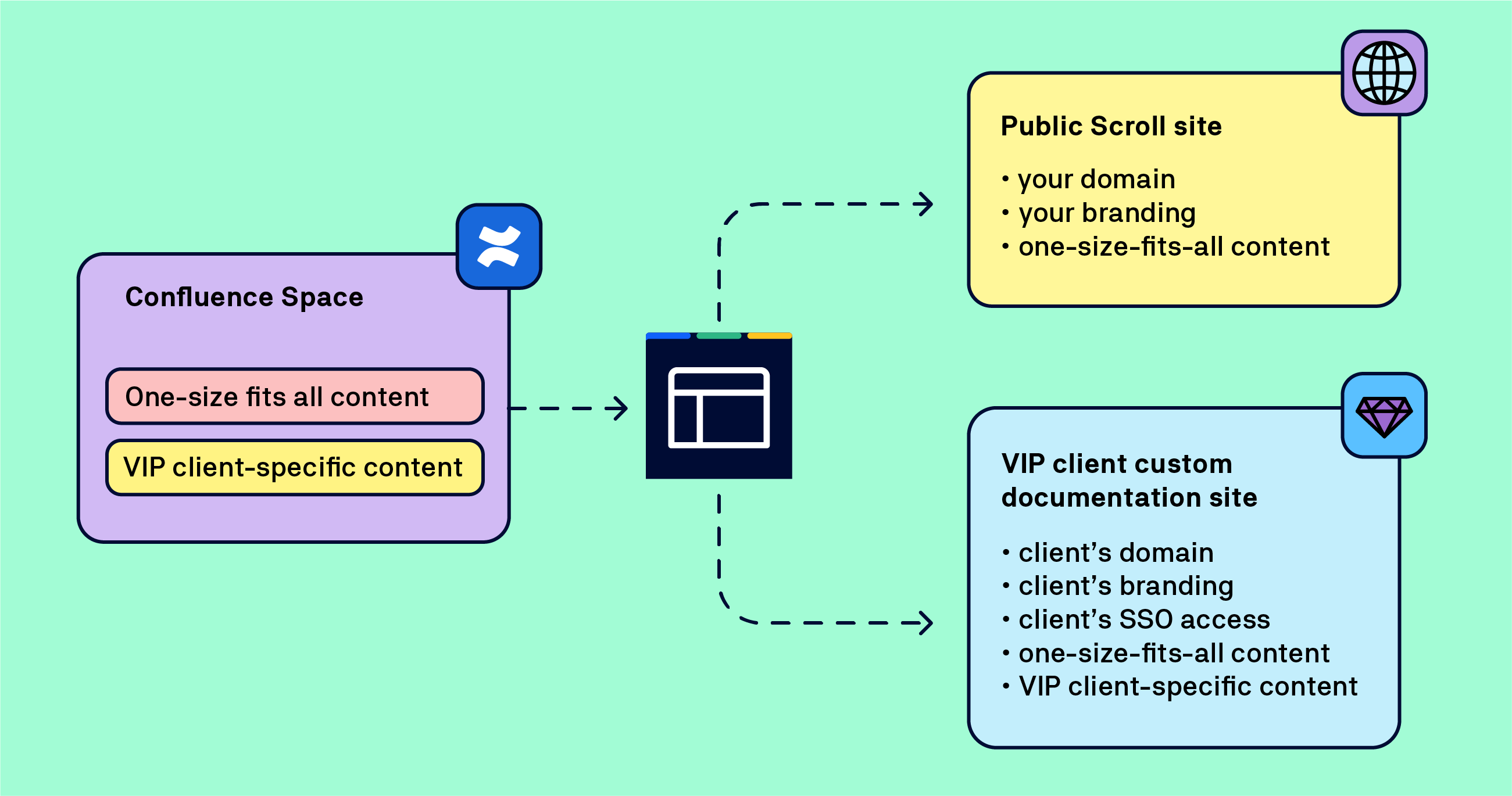
Let’s recap the requirements.
-
your customer’s domain
-
your customer’s branding
-
access protected by your customer’s SSO
In this phase, you will closely collaborate with your VIP client. Having said that, the process for configuring access to the site and customizing its look and feel is exactly the same as if you were setting up your own site.
Step 1: Customize the domain
The process for connecting your domain to the website built with Scroll Sites is described in our documentation.
In a nutshell, you have to generate CNAME values within Scroll Sites app on your Confluence and ask your VIP client to add them into their DNS configuration.
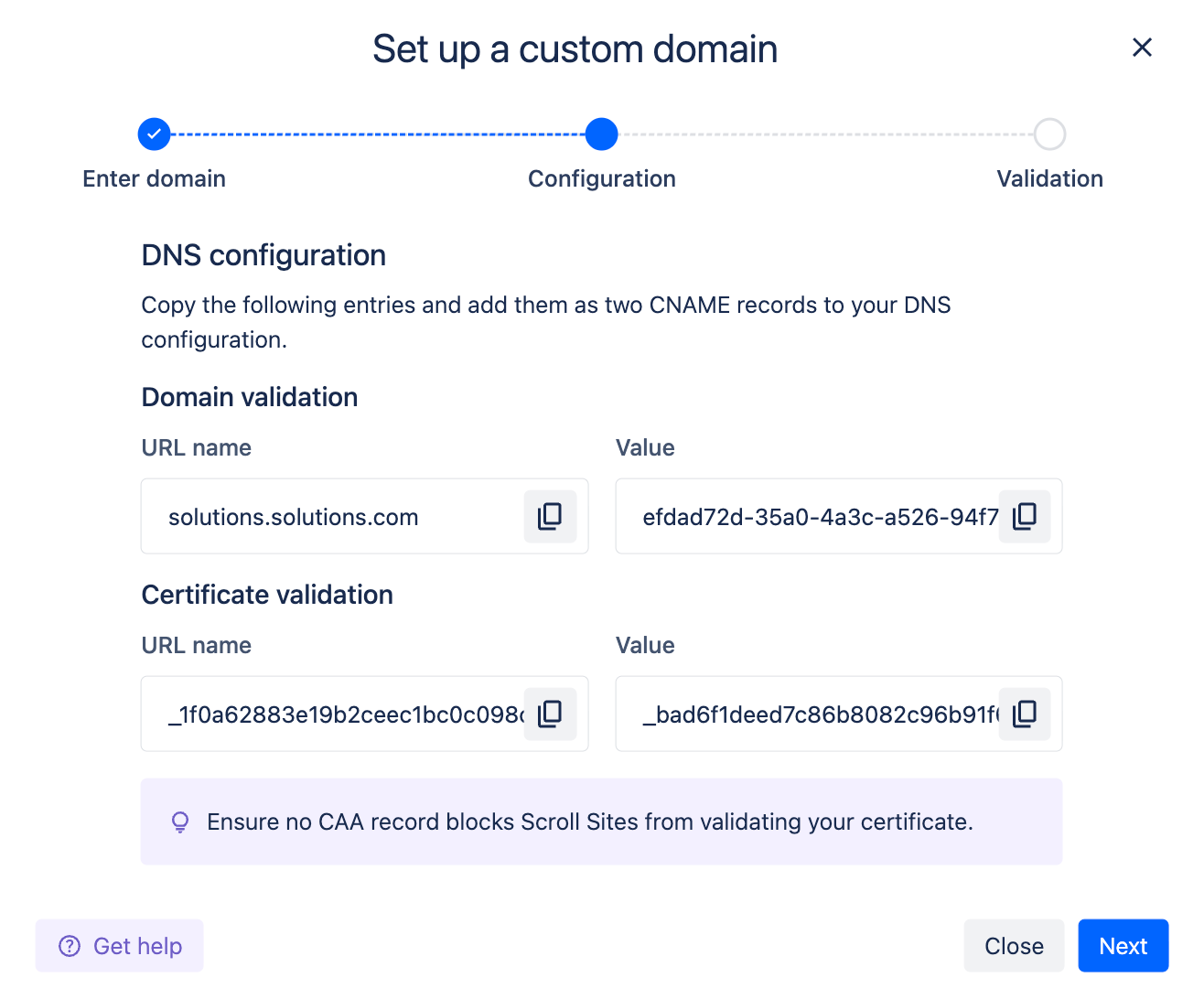
Once the values are validated, your client’s website will be accessible at the desired domain.
Step 2: Set up the SSO access
Scroll Sites allows companies to create websites with restricted access – independently from Confluence licensing and Atlassian accounts. This enables a whole array of use cases. For example, you can create private websites, intranets, and internal documentation portals.
Access is controlled either by a password or, in a more advanced way, via SAML SSO. Now that you’ve connected your VIP client’s domain, you can connect the VIP Scroll site to their SSO setup.
Again, the process is identical as if you were working with your own site. After you generate the SAML values in Scroll Sites, ask your client to paste them into their identity provider setup.
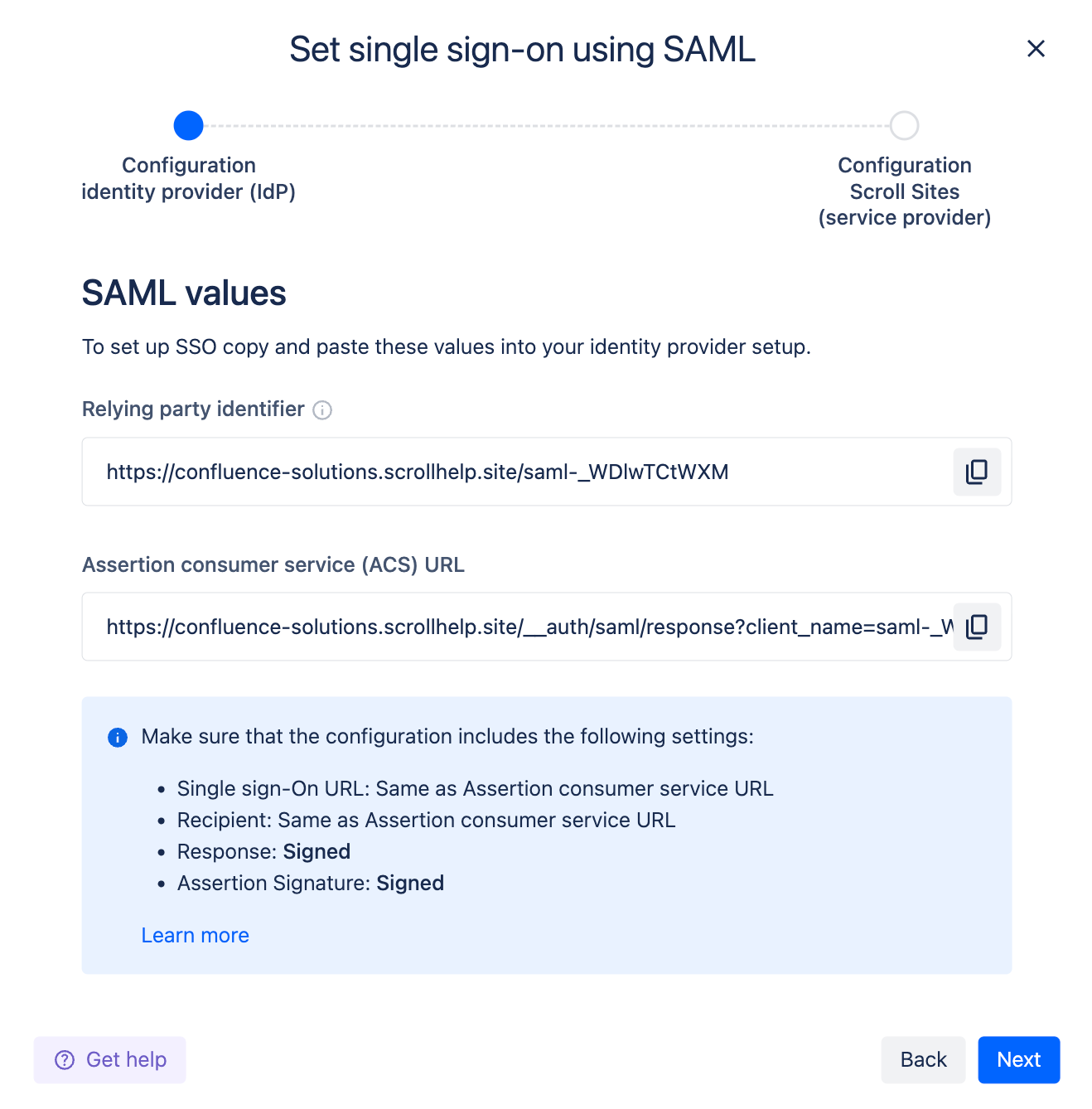
After the handshake, your VIP client’s website will be only accessible with their SSO credentials.
For a step-by-step guide, see our Scroll Sites documentation about setting up SAML SSO.
Important!
-
While you don’t need SSO access to update documentation on your client’s Scroll site, we do recommend that your client grants you access so you can verify updates, troubleshoot issues, etc.
-
Advise your client to properly configure and maintain access to the website in their identity provider’s settings and provision users in line with their security policy.
Step 3: Customize the look of your client’s website
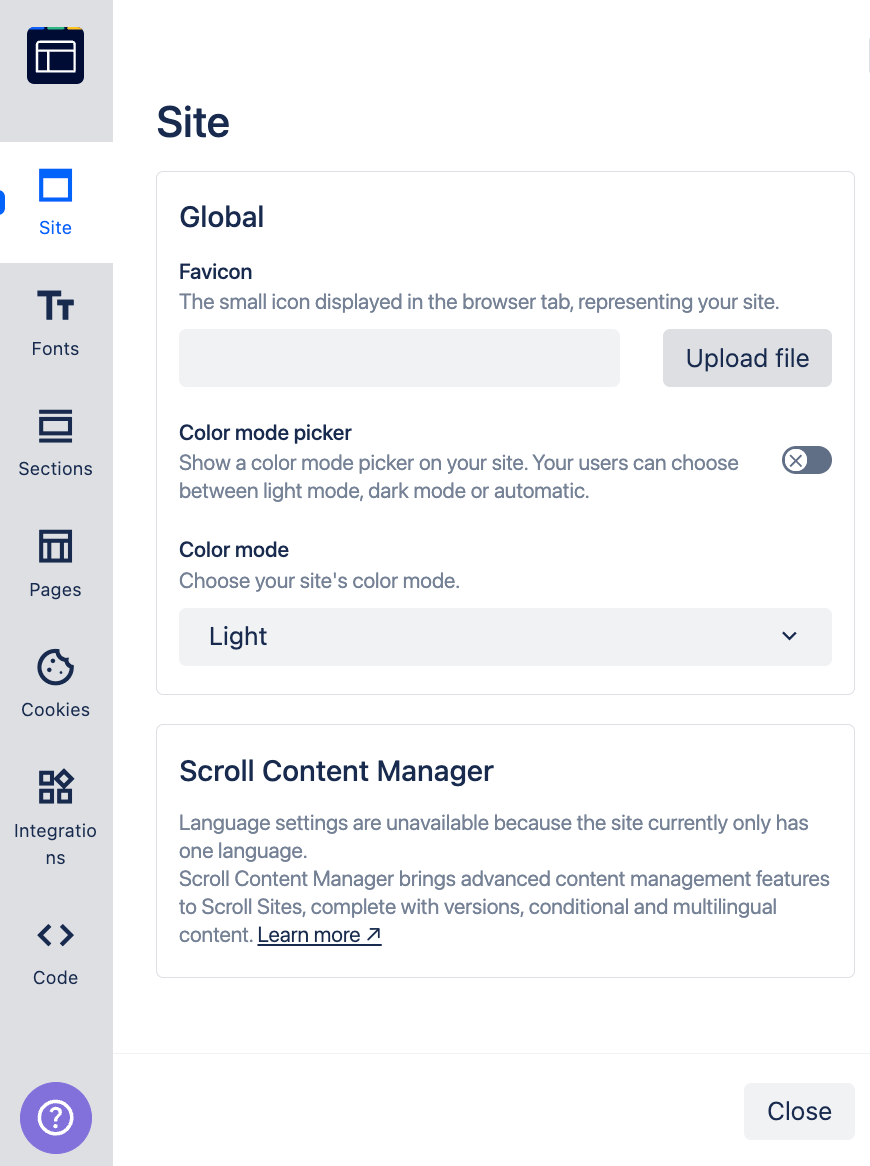
For a full custom experience, you can easily adapt the look and feel of your VIP’s customer documentation portal.
-
Use the default Scroll Sites options to tweak layout, colors, fonts, etc.
-
Customize CSS and JavaScript
This level of customization will require a closer cooperation with your client’s designers and, potentially, developers so we recommend that you keep future maintenance efforts in mind.
Updating Your Multi-Tenant Documentation Setup
Let’s look at the best practices for maintaining the setup of two documentation websites with slightly different content.
To recap, your documentation life cycle strategy needs to consider the following scenarios:
-
Your general, public, website follows your regular release schedule, and receives updates to content with the
generallabel. -
Your VIP client’s website will have to accommodate any updates to the custom content labeled
vipon top of thegeneralcontent.
Scroll Sites allows you to treat every site independently – including the update schedule. For example, your general public site can have live updates so that any saved update to a Confluence page appears in a Scroll Site within seconds. On the other hand, you can go with manual updates for the custom VIP site given the fact that you’re working with custom content.
Advanced Multi-Tenant Docs Setup Options
Scroll Sites allows you to create as many sites as you need, each with its own design, URL, protection, and many advanced options utilizing the full range of our Scroll documentation platform.
Some of those options would help you address advanced product strategies, including meeting demands of regulated industries.
One site per client
This might sound crazy but we came across setups where our client created a dedicated site for each of their customers.
Why? A county authority required that an emergency service had a unique documentation site for every municipality. There were minor content differences such as the scope of responsibilities, contact details, etc. But it was extremely important that each website is unique (content, access) to meet compliance requirements. A city-based domain was necessary.
The magic of this setup was that the entire operation was run from a single Confluence space.
Another practical use case is based in health care services. In this scenario, employees of specific hospitals access only the documentation for services their hospital provides and access the Scroll Site from their hospital’s SSO.
Region-specific sites
Scroll Sites is perfectly capable of creating and rendering multilingual sites. Using Translations for Scroll Content Manager, you can easily author and maintain multilingual content in Confluence, even using the professional localization XLIFF format.
However, if your presence is truly global, you may think twice to create a single documentation site with 20 language options.
What you can do is to create regional sites – each on a specific domain, each with a specific set of language options.
-
North America – American English, Spanish, Quebecois French
-
Europe – British English, Spanish, Portuguese, German, etc.
-
Asia – Japanese, Chinese, Simplified Chinese, English, etc.
Early-access documentation site
In this scenario, you have your regular documentation site. You also want to allow your clients to access documentation for yet-to-be released features. Public but not findable and indexable, link-only.
You can easily set up a new Scroll Site as your early-access knowledge base, on its own domain, hide it from search engines (a question of a single toggle), and push documentation updates independently of your official documentation portal.
This dual-tier documentation strategy is quite common and its major advantage in the Confluence world is that it doesn’t require enabling anonymous access.
Secret tip: that ‘unique tenant’ can be your internal customer such Support or Services team who would appreciate early access to the official documentation before the official release.
Split documentation strategies
The ability to split content along the pre-defined conditions into two or more independent Scroll sites comes with another advantage – each site can follow a different documentation strategy.
For example, one site can receive updates as they come to match the continuous delivery of your product. The other site can support semantic versioning, allowing users to toggle among specific versions of your documentation – going back from, for example, 3.0, to 2.9. or 2.8.
This arrangement is extremely useful in situations in which customers can decide whether to receive automatic updates or make their own decisions when to update, a scenario quite common in the enterprise world.
To implement split documentation strategies, simply set up versioning in Scroll Content Manager.
Frequently Asked Questions
Q: What is a one-to-many documentation strategy?
A: A one-to-many publishing strategy means authoring and managing documentation centrally in a single Confluence space, then publishing tailored versions of that content to multiple websites or customer portals.
Q: How does conditional content work without duplicating Confluence spaces?
A: Scroll Content Manager uses Confluence page labels, such as general and vip, to create variants. These rules determine which pages are included in each documentation portal, so you can keep one central source while publishing different content sets.
Q: Does conditional content work for individual paragraphs or sentences?
A: Yes. Using the Scroll Conditional Content Macro, you can designate a section of page (paragraph, sentence) to appear only in a selected variant. In the scenario described in this article, a paragraph explaining a VIP-client-only custom option on a general-labeled page, would only appear in the VIP documentation portal.
Q: Do external clients or viewers need Confluence licenses?
A: No. Scroll Sites manages access independently from Confluence licensing and Atlassian accounts. You can protect client portals with a password or connect them to the customer’s identity provider using SAML SSO.
Q: Can client-specific portals have custom domains and branding?
A: Yes. Each Scroll Site can be mapped to a customer’s custom domain using CNAME DNS records and customized with logos, brand colors, fonts, custom CSS, and JavaScript.
Q: How do updates and publishing schedules work across multiple sites?
A: Each Scroll Site can have its own update schedule. For example, the public documentation site can receive live updates whenever a Confluence page is saved, while a VIP portal can use manual updates for controlled review.
Q: What is the difference between single-source authoring, single-source publishing, and multi-tenant (one-to-many) publishing?
A: The difference comes down to your workflow, output formats, and audiences:
-
Single-source authoring is the foundational workflow. You write, edit, and maintain all your documentation in one centralized location (a single space) instead of managing duplicate copies across different spaces.
-
Single-source publishing is about format flexibility. You take that centrally authored content and publish the exact same information into multiple output types, like an HTML website, a downloadable PDF, or an in-app help widget.
-
Multi-tenant (one-to-many) publishing is about audience flexibility. You use conditional rules to publish tailored subsets of your content to multiple independent platforms. The output format might be the same (e.g., multiple websites), but different clients get a unique, custom-branded portal showing only the content relevant to them.
Ultimately, Confluence and the Scroll Platform apps allow you to combine all of these concepts flexibly, giving you a centralized authoring environment that can deliver both tailored content and multiple formats.