While online content management platforms like Confluence are the standard, offline documentation remains vital for reliability and field accessibility. In industries such as aviation, mining, and infrastructure, non-rebootable formats like PDF, Word, and portable HTML are the only way to ensure mission-critical information is available in remote or air-gapped environments. Whether it’s for convenience or compliance, having locally stored, high-fidelity manuals prevents operational downtime when the grid fails.
In this article, we discuss circumstances that mandate offline documentation, as well as options that the Confluence ecosystem offers to satisfy the demands of specific industries. You will learn how to enable professional single-source workflows and produce branded, version-controlled offline assets that maintain the integrity of your documentation.
Common Use Cases for Offline Docs
Product documentation used to mean a thick paper book to read on a commuter train or a .txt file on a floppy disk. Later, you would get a PDF file and perhaps an HTML package on a CD. Today, online documentation centers and SaaS platforms like Confluence are the norm, leading many to question if offline formats are still necessary.
But in the age of always-on, cloud-based content, what happens when you actually need to go off the grid? And what are your options if you use Confluence?
The truth is offline documentation is critical for field operations and compliance, even in a cloud-first world.
Offline docs and documentation life cycle
When considering if you need to plan to include offline content within your documentation life cycle management, there are two factors to consider. And it doesn’t matter if you are documenting a policy, software, or heavy machinery.
-
Convenience
-
Compliance
Ask yourself. Are there practical reasons and benefits to have documentation available (stored) locally as a PDF or an offline HTML, or even printed? Are you or your end users required to have offline documentation?
Let’s consider the aviation industry. Airline pilots used to carry printed manuals with them on board just a few years ago. Many still do despite the fact that the manuals are available on tablets. As The Aircraft Owners and Pilots Association says, “paper charts never need to reboot”.

They have a point. Industries that most often request (printable) offline documentation are field operations – infrastructure construction and maintenance, heavy machinery, or transport services.
Usage circumstances are important. Imagine an underground mining facility, locations that prohibit internet access or outright ban any devices that can transmit data wirelessly.
Where and when end users must operate off the grid, loading a PDF or an HTML on a laptop is the only option. Where using electronic devices is not exactly optimal – due to weather or general environmental conditions – a printed, well indexed booklet will be a superior medium.
Whatever is your use case, publishing offline documentation must be a part of your documentation strategy.
Offline Documentation as a Compliance Requirement
There is a significant overlap between use cases in which offline documentation is required by both off-the-grid circumstances and legislative or industry requirements. In other words, offline docs are not optional, they are either necessary or mandated. Or both.
Bulletproof offline version of your documentation is conditio sine qua non (condition that must be met) in many regulated industries.
Let’s look at the areas where offline documentation is mandated by compliance requirements.
Critical infrastructure
The exact definition of critical infrastructure depends on specific national legislation but typically includes a combination of utilities such as water distribution and power grid, transport systems, hospitals, defense, and IT security.

Offline documentation and printed copies must be available at any time in case of power outages or internet access disruption.
All regulatory frameworks such as NIST in the United States, NIS2 in the European Union, and the national implementations such as France’s CERT-FR and OIV and Germany’s KRITIS umbrella, require offline documentation for mode dégradé.
Learn how to create templates for ISO 9001 and DIN 5008 documents.
Secure offline locations
Banks, defense organizations, government agencies, data centers, and, again, critical infrastructure facilities often shield sections of their operations from the actual internet. Mainframe systems, while processing millions of I/O transactions every hour, are notorious for being inside a DMZ (demilitarized zone) or protected by similar multi-layered security infrastructure. In such scenarios, it’s inconceivable to allow operators to access regular online documentation.
Field operations
Remote locations, wilderness, adverse weather conditions… anything that makes relying on online documentation a very risky strategy.
Let’s not sugarcoat it. A printed manual never needs a reboot. And it never needs a stable internet connection. Neither does a local HTML version.
Creating a highly usable offline manual for such conditions is tough. You need to account for multiple formatting and layout options, cater for specific use cases and format outputs. Look for tools that offer integrated Confluence solutions, customizable templates, and easy API integration with your infrastructure.
Audits and immutable proof
Confluence saves versions of individual pages and supports PDF exports. But that may not be enough for regulated industries such as pharmaceutical, defense, health care, and financial services that are subject to HIPAA, ISO 27001, SOC-2, and QMS requirements.
Not only do these standards require immutable copies of individual copies, such documents must often include embedded additional metadata (who, when, for what purpose, etc.). Over time, these snapshots will build an audit trail.
A typical use case is a technician generating and printing a physical copy of a Standard Operating Procedure document with a specific watermark and indicated version number to prove they completed their job following that specific set of instructions.
If you are a documentation manager and/or are involved in documentation management and authoring in any capacity, do establish a working relationship with your company’s Compliance and/or Legal departments.
If you want to learn how to approach managing compliance docs, see Mastering Documentation Compliance in Confluence: Workflows, Audits, and Localization.
Native Confluence Export Formats
As your team uses Confluence as a single source of truth, you know that generating reliable offline formats can be challenging. In Confluence, you have the following export options for offline use:
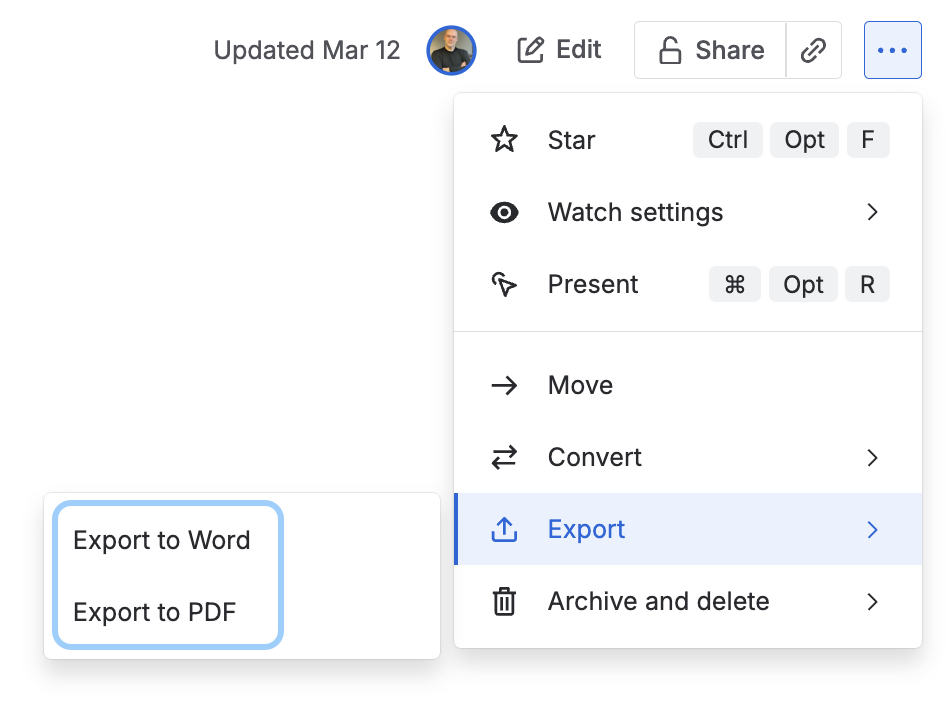
Single pages
-
Word format (
.doconly) -
PDF
Spaces
-
PDF
-
HTML
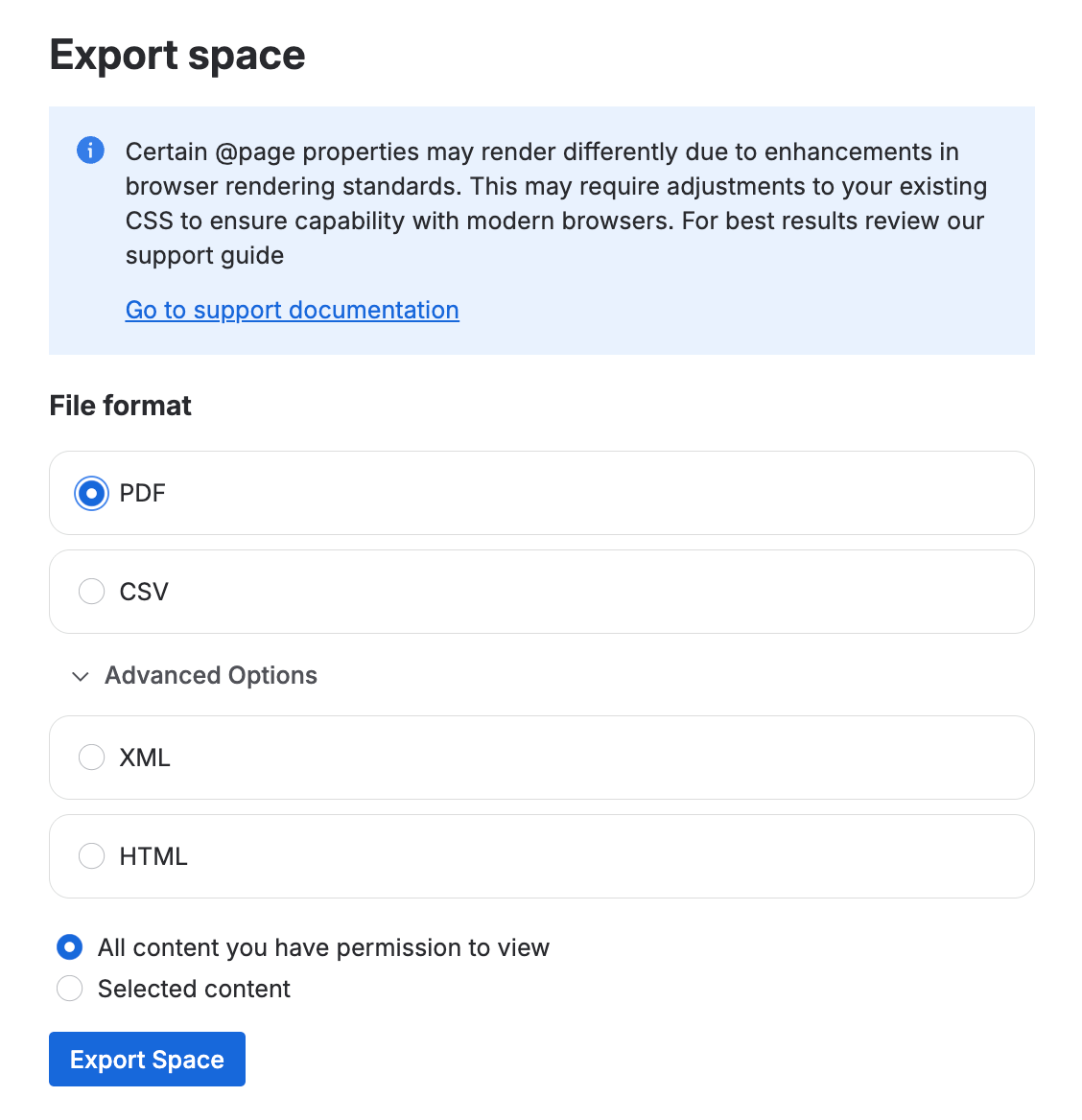
Note that XML and CSV options are intended for importing content into another Confluence site.
Exporting pages to the Word format
The old-school Microsoft Word format works when you need to share a single page on a one-off basis. We recommend checking the exported Word document and editing it if necessary. Beautifying the document might be necessary especially if the page contains complex elements or text in macros.
The obvious disadvantage of a single page export strategy is the loss of coherence and context. Individual Word files remain exactly that and any links will take readers back to Confluence.
Confluence exports Word document in the plain *.doc format. Some tools would refuse to open it so ensure that you convert it to the *.docx format before you share it.
Exporting pages and spaces to PDF
Use the PDF format if you want to share an immutable version of your Confluence page or space. Unfortunately, standard PDF exports suffer from formatting issues as the export algorithm struggles to cope with structured text, macros, images, tables, … you get the picture.
Confluence offers you the option to customize PDF exports by uploading your own CSS style sheet but this programmatic option is not for everyone. To their credit, Atlassian added options to adjust some parameters such as fonts, page orientation, and margins via a graphical user interface.
Exporting content as HTML
HTML export works only on the space level although it does allow you to export just a selected page (or pages). However, the native HTML Confluence export seems to be mainly positioned as an alternative to the XML and CSV import formats, in other words, for subsequent import into a different Confluence site.
However, user-friendly HTML exports are both important and convenient as an offline documentation format. They’re quick to use and offer experience very similar to online documentation. Considering that offline docs are often used in less than ideal scenarios (emergency, adverse conditions), the familiarity factor plays a huge role as users can simply access information where they need in a very familiar format.
For example, if you’re using our Scroll Sites app to build your online documentation site or knowledge base from Confluence content, you can use Scroll HTML Exporter to create the portal’s offline pendant.
Limits of Confluence Export Options for Offline Formats
On the Confluence page, you can expand the table’s width beyond the text width. You can have 50 rows. This will work online, it will work as offline HTML – just remember that even HTML exports need to work for the user and resemble the online experience as closely as possible.
But if you want to create an offline documentation format version of your documentation, whether a docx or a PDF file, you need to adapt your content. Even more so if you expect that PDF to be printed. Exported PDFs (and Word format pages) often suffer from formatting inconsistencies around more complex content structures (lists, images, tables, etc).
What further complicates things is the variety of content. Some Confluence pages may be table heavy, some are arranged into two columns, others may contain mostly diagrams and blueprints.
You can, of course, create a PDF export CSS stylesheet programmatically. However, catering for all formatting eventualities would result in an extremely complex file and the risk is that a slight deviation from the norm might ruin the whole PDF.
Another option is to simplify your Confluence pages and limit yourself to just a handful of macros and enforce the rules.
None of these options scales well.
Improving Confluence PDF Exports with Templates
Whatever your reason is to transfer your Confluence content into offline documentation formats – whether in the electronic or printed form – the output must offer convenience and ease of use comparable to online documentation.
What all mature documentation platforms have in common is using a single source to produce output in multiple formats. To handle conflicting requirements, the conversion happens somewhere along the way between the source and the output by way of templates.
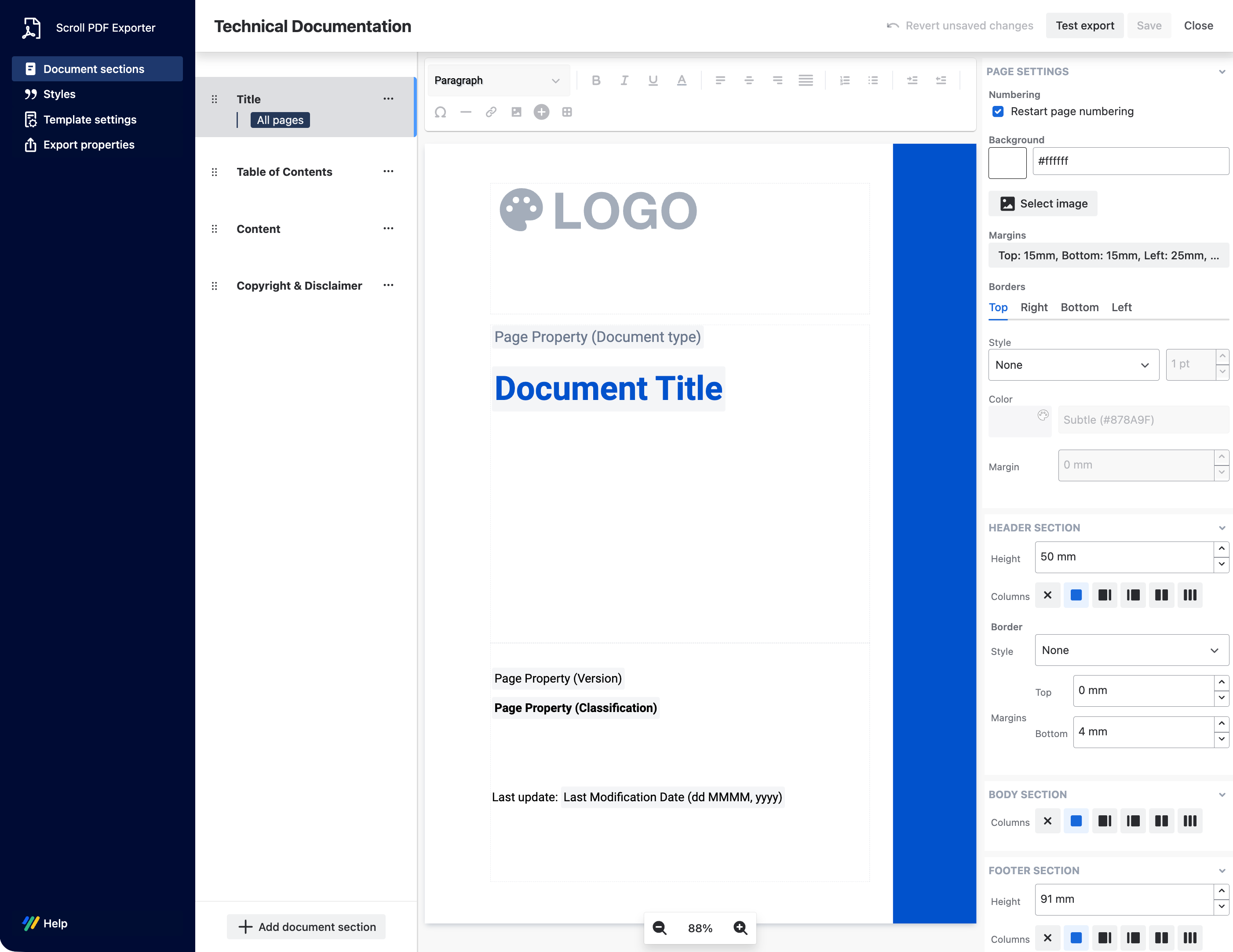
Within our family of Scroll exporters for Confluence, you can create highly customized and branded templates to match your content type with your target audience - whether you export to PDF, Word, or HTML format.
Many teams abandon Confluence when things get more complex fearing that their needs have outgrown Confluence native abilities. Even when they realize that Confluence is an extremely good tool for authoring and managing documentation.
Watermarking and Customizing PDF Exports
Once a document is distributed as a PDF file or printed on actual paper, you no longer have control over it. The PDF has its own independent afterlife. But products are updated, features are added or deprecated, and the source document changes.
You need to make precautions and implement policies, and tools, to ensure that whoever is using a specific version of a PDF knows what they’re using.
Offline documents are often used to distribute information before it’s officially available. You may want to share a page or whole doc set with a legal partner firm. Or with selected customers before the release to support a Beta Testing of your software.
In both cases it’s adamant that you make it clear what exactly you’re distributing. Header and footer might work but the safest option is watermark.
The following image shows a page from a PDF export of a Confluence space using our Scroll PDF Exporter. Note the independent elements in the header, footer, and the watermark sign – those elements do not appear on a regular Confluence page.
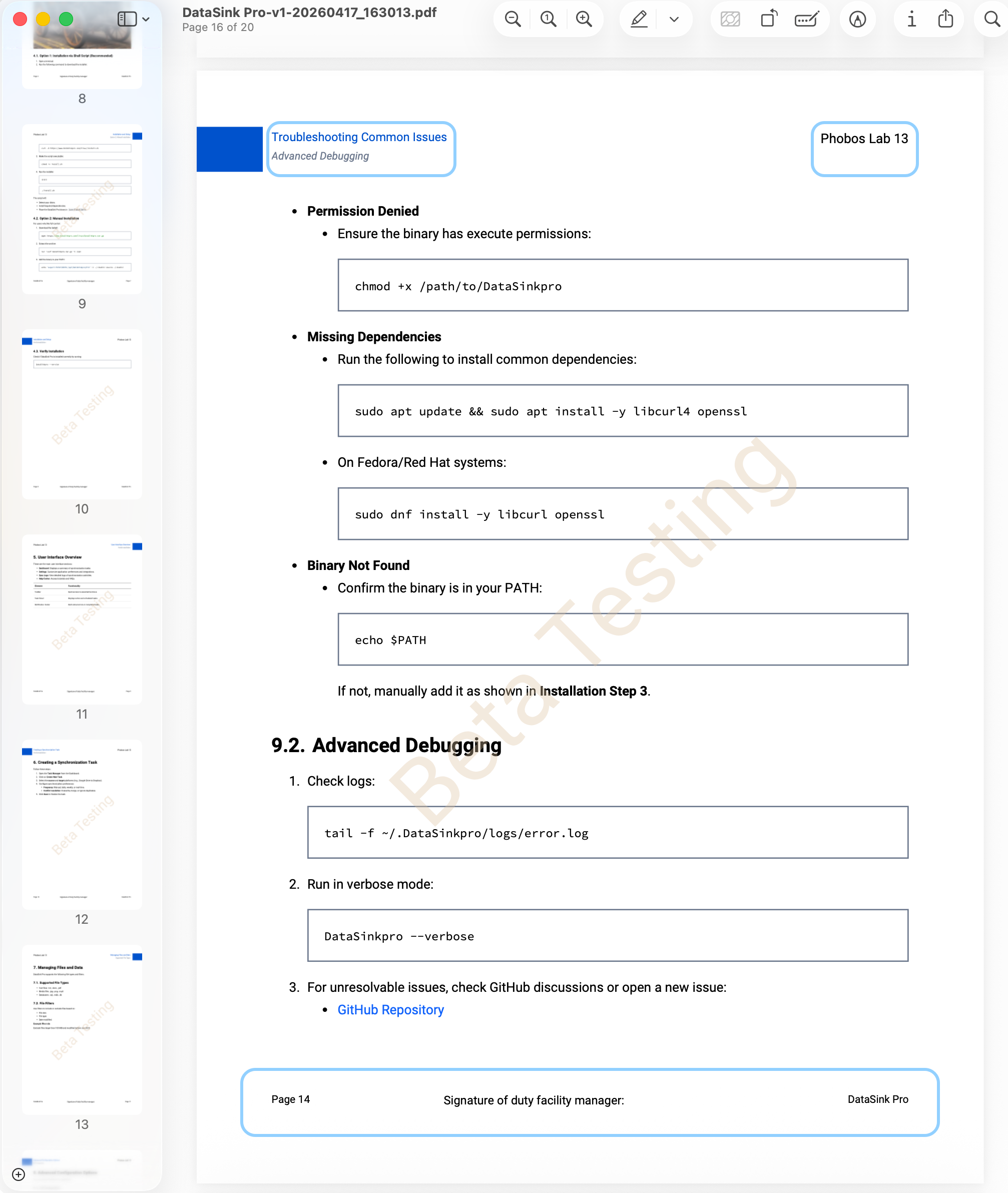
Defining such elements and metadata in individual export templates allows you to create PDF files that match a specific use case, whether you’re creating an SOP or a field use manual.
Watermarking provides an immutable stamp and lends a specific identity to your offline documentation. You can configure the watermark to display the following:
-
Date of export - perfect for audit trails
-
Name of the author
-
Name of the person who initiated the export
-
Text information, such as
-
Expires on February 30, 2027
-
Confidential
-
Burn after reading
-
C-level only
-
Why Version Control and Content Variants Are Crucial for Offline Docs
Documents and content in general need to evolve and your documentation life cycle management must ensure that every output format is always up to date.
Version you entire doc sets
Compliance and regulatory requirements must be a part of your documentation strategy network – including provisions for handling offline documentation requirements in the context of documenting changes. Confluence saves and stores each published version of a page. However, as Confluence is geared towards collaboration and flexibility, versions can be deleted and restored, so you need a dedicated approval workflow app to maintain the immutable history of any given page.
In many cases, version control goes beyond the single page history. Instead, the focus is on creating, saving, and storing immutable versions of the entire doc set within a Confluence space. In other words, you have to create a series of snapshots that would document specific moments in time - release of a new product, an update to a new version of security protocol, etc.
Outside of the regulatory framework, the need for versioning entire documentation sets is practical. Maintenance work on power grid elements may require working with components sporting different versions of firmware depending on the year of manufacture. That requires access to multiple versions of documentation. In the software world, this is called semantic versioning (2.5.1, 2.5.2, 2.6, 2.7, etc.), other industries deploy their own versioning nomenclatures.
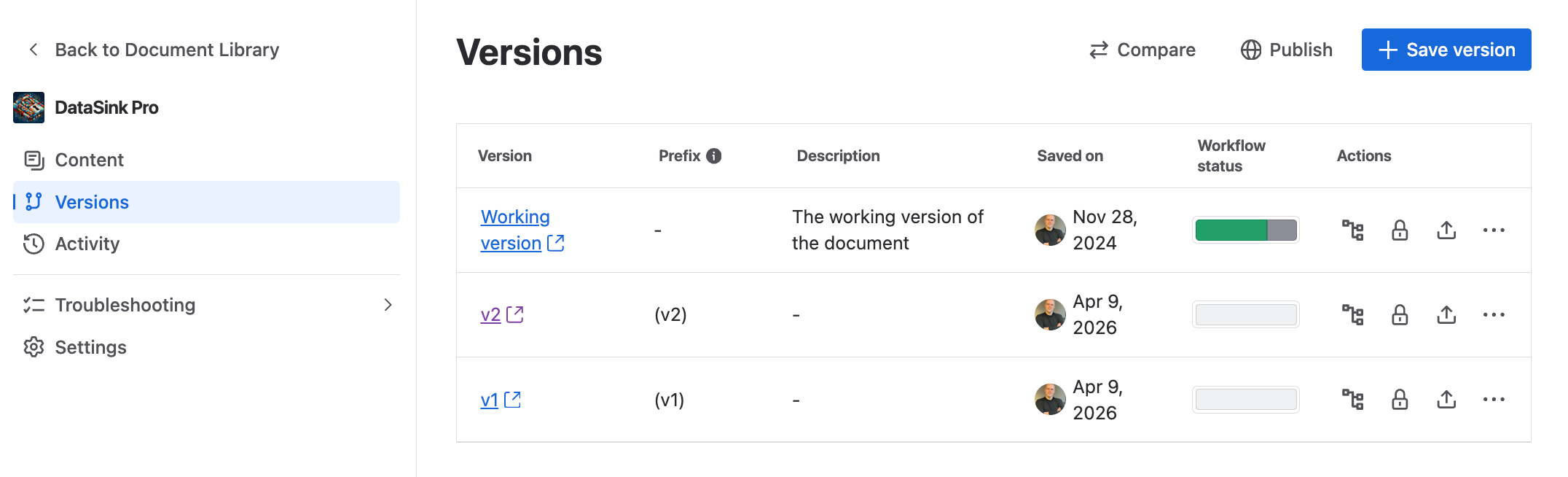
In Confluence, you are limited to creating space exports or space copies, these methods are, however, extremely difficult to maintain in the long run. Scroll Content Manager allows you to go around that limitation by allowing you to create and manage snapshots of your content that you can make available in your Scroll Site’s documentation portal or export in any of the formats supported by Scroll exporters.
Adapt your offline content for specific assets or roles
If you ever stumbled upon a Confluence app documentation where every step of instructions reads “Do this. If you are on Data Center, do that.” then we regret to inform you that your marketplace app vendor could use a lesson in conditional content and content variants.
What’s the difference between versions and variants?
-
Versions document how something developed over time - they are snapshots.
-
Variants document content ‘flavors’ coexisting at the same time. An app that’s available both on Cloud and on Data Center has documentation in two variants. Crucially, both docs variants are authored and managed in a single source.
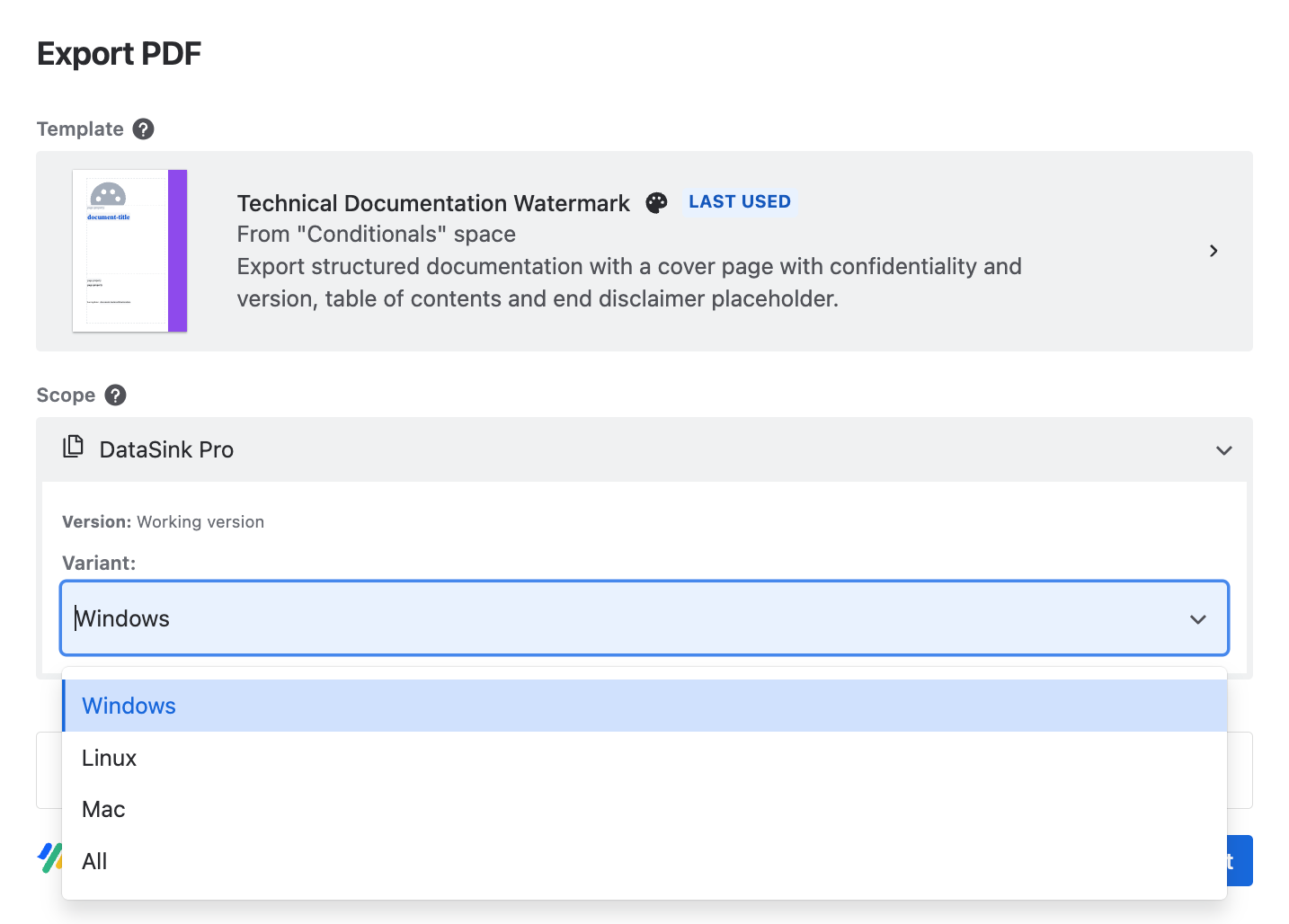
With variants (they are a part of our Scroll Content Manager), you can maintain documentation in a single Confluence space. You simply define conditions (hence conditional content) that determine which pages or parts of pages apply to both Cloud and DC flavor of the app, or just one.
Then you can export a specific variant as a PDF, Word or HTML. This will help users to export a document that’s specific to the task or the product while making your documentation maintenance significantly easier.
Final Thoughts on Offline Documentation
We listed only some of many use cases for offline documentation. Your needs might be different. Your customers' preferences might be unique.
A fairly common use case is sharing documentation with specific clients prior to the official product/feature release. A PDF is the simplest and fastest solution. A watermarked PDF that says ‘private pre-release copy’ is even better.
And finally… Some people just prefer to read and annotate paper copies. And PDF is just here to stay.