As a Confluence feature, anonymous access has a single purpose – allow people without a paid seat to access content of a Confluence space. But anonymous access is not without risks and that’s why many organizations ban it the moment the discussion rightly shifts from what should be public to what could accidentally become public. In this article, we’re looking into risks posed by anonymous access and best practices to minimize dangers.
What is Anonymous User Access
Anonymous access is a Confluence space setting that allows admins to share a space with the outside world – anyone can access space content without a full, paid seat.
Opening a Confluence space for anonymous access is the most common method to share content of entire spaces with the world wide web. Especially for companies that use Confluence as their product documentation CMS.
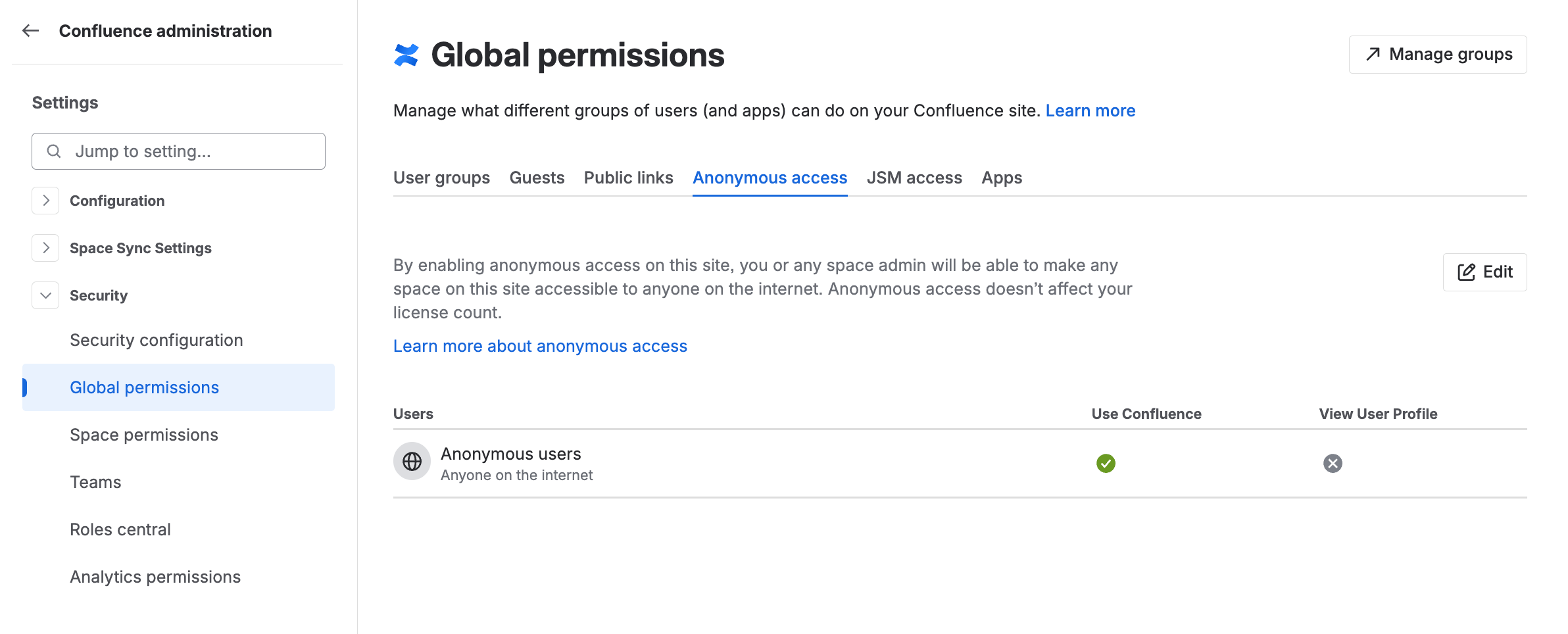
Confluence admins can control anonymous access at the site and at the space level.
-
Site-level setting – must be enabled to allow space admins to activate anonymous access in individual spaces.
-
Space-level setting
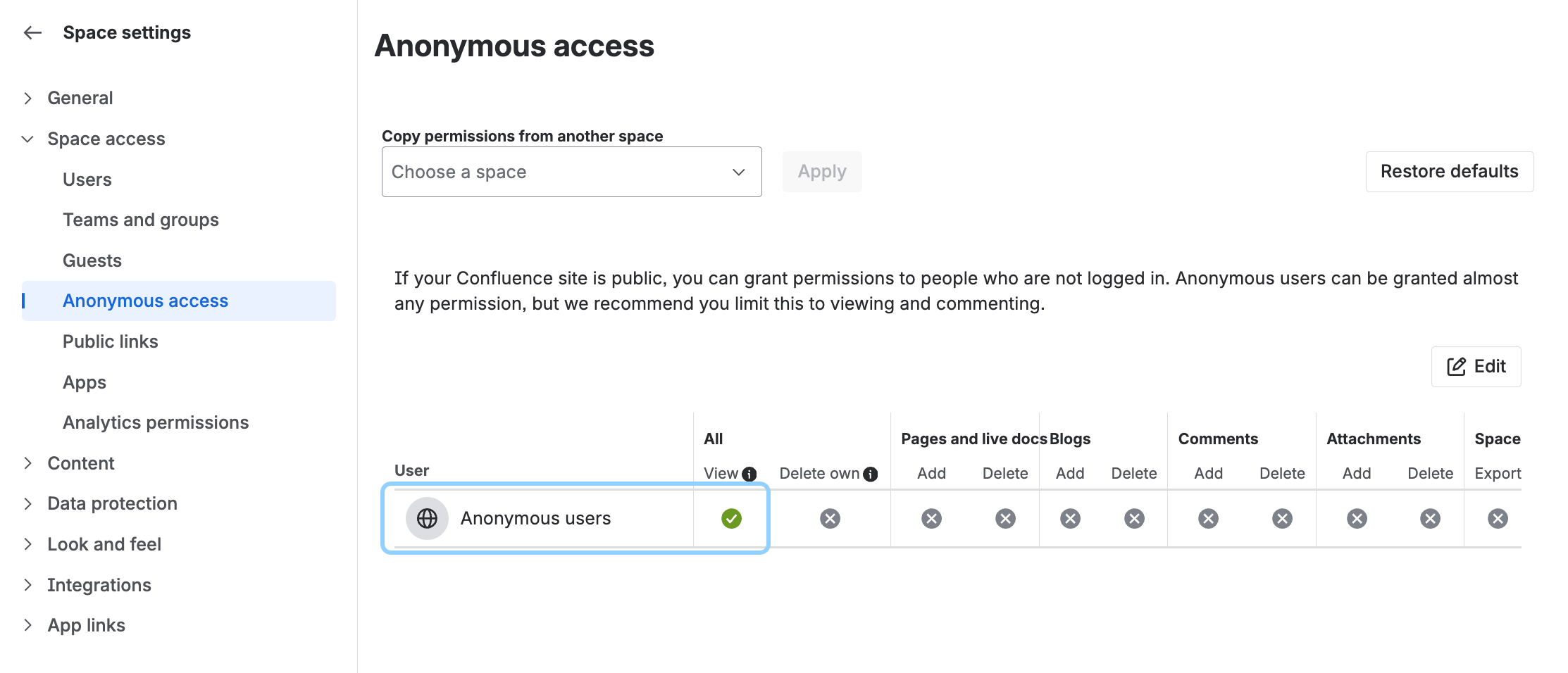
Notice that anonymous users, and that means literally anyone on the internet, can have a lot of the same permissions as a managed user with a paid seat.
So, unless you have a very specific reason, and know exactly what you’re doing, keep publicly shared spaces view-only. But more on that later.
Use Cases for Anonymous Access
While the Confluence user interface is not the prettiest, it’s perfectly functional. Clean navigation tree, the no-nonsense main content section, and support for the full monty of Confluence content types and macros create a feature combo that simply works for readers.
-
Product documentation
Confluence is a great content management tool for documentation and many teams use anonymous access to make their product docs available to end customers. -
Trust centers
You don’t need a fancy website to share security and privacy policies, or compliance certificates – a single Confluence space with anonymous access is a quick and affordable option. -
Brand guidelines and press kits
-
Roadmaps and contribution guidelines
The examples above are all typically long-term assets. But the ease of use and the ability to share content with just 3 clicks opens the anonymous access feature for ad hoc and short term use cases, for example, conferences or hackathons.
Affordability makes Confluence an attractive tool for simple websites – even for retirement homes and school clubs – extending Confluence reach far beyond the corporate world.
Limitations and Workarounds
Sharing Confluence content in a space that is open to anyone on the internet requires a couple of house rules. Depending on your organization, they would reach from best practices to enforced content governance.
Anonymous user access has its practical limitations so if you’re considering enabling it, ensure that you understand the downsides.
-
Anonymous access always applies to the entire space.
-
Consequences
Once you publish (save) the page, it’s live on the internet and anyone can see it. -
Workaround
-
Ensure that you only publish pages that are 100% ready and checked.
-
Strict page status policy, application of page restrictions, or the use of a two-space method where you use one space strictly for authoring and workflows, and then synchronize content to another space where anonymous access is enabled.
-
-
-
Cross-space content re-use is problematic.
-
Consequences
Confluence offers three methods of content re-use - include content, excerpt/insert excerpt, and synced block macros. If your public space contains content that originates in spaces that do not have anonymous access enabled, readers will not be able to see it. -
Workaround
Either open those spaces of origin to anonymous access or duplicate content in the space that you actually want to share. The former is a security issue, the latter adds to workload.
-
-
Mixing public and private content in a single space is risky.
-
Consequences
-
You are always one ‘publish’ away from revealing your internal information.
-
Forced separation of internal and public content may become problematic and force teams to manage two spaces with nearly identical content to prevent accidental publishing of internal-only pages.
-
-
Workaround
The two-space method is set up to exclude specific pages from synchronization.
-
Anonymous governance tax
If you accidentally publish sensitive information to a public Confluence space, even for a short while, you cannot trace who accessed it.
Anonymous access requires strict application of workflows, compliance, and governance best practices. That increases requirements on managing content throughout the entire life cycle.
Identity Crisis of Anonymous Access
Let’s assume that you sorted out all the downsides, you only share content that you really want the world to see. Great! There are just two problems.
-
All confluence spaces look the same.
-
They’re all on the atlassian.net domain.
You don’t have to be a brand-identity obsessed marketeer to see that this is far from ideal for most circumstances. Confluence Cloud does offer some visual customization options (color of the top bar, header and footer image), but not much else.
Navigation and search is also an issue, especially if you are sharing multiple spaces.
Anonymous access leaves a lot of Confluence user interface and functional elements fully visible. That impacts usability for the user and might become a headache for admins and compliance officers (more on this later).
As you can see, any comments on the Confluence page (blue highlights - left) are clearly visible for anyone who looks at content as an anonymous user (red highlights - right).
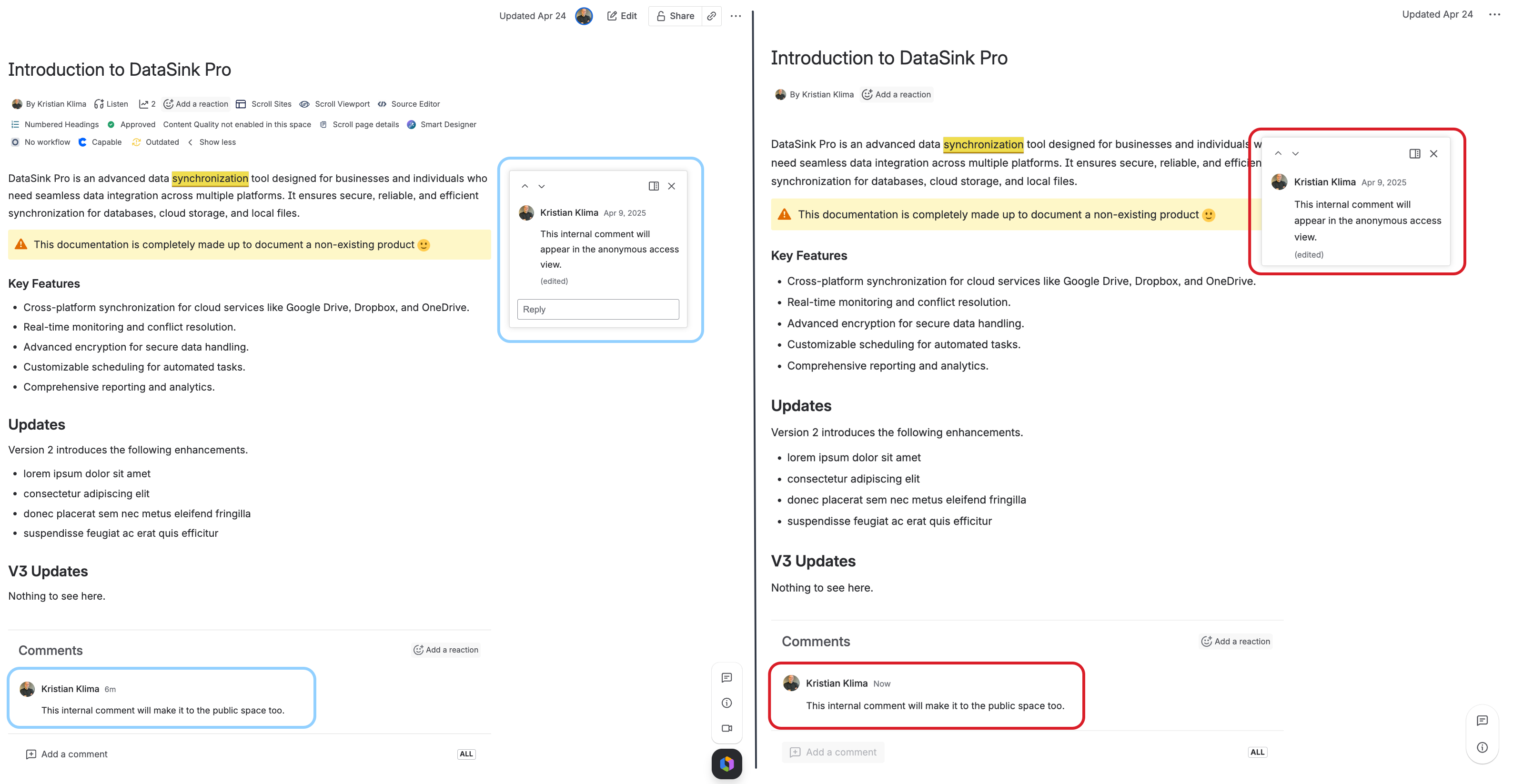
That means that comments made in the confines of a Confluence space will become public.
Band-aid solutions
Content teams often try to cure Confluence stock bluntness with so-called theme apps from the Atlassian marketplace (such as Refined Sites and Spacecraft).
Such apps extract content from a public Confluence space, put a CSS skin on top of it, and may offer a custom domain.
These apps transform the look and feel of your publicly shared content but they require that anonymous access is enabled on any Confluence space that you want to share publicly.
You may have your custom domain but your Confluence site is still exposed to the internet. As a result, such apps fail to address the biggest weakness of anonymous access.
Security.
What Anonymous Access Reveals
While anonymous view-only access to Confluence is not inherently unsafe, many companies disable it for security or compliance reasons. It’s not about what should be public – it’s about what could accidentally become public.
As the saying goes, the road to hell is paved with good intentions permissions.
Sharing too much
When you enable anonymous access, you’re sharing more than just your Confluence space’s content:
-
Page details such as author, date, labels, page history, attachment details…
-
Export options to PDF and Word remain available.
-
Space details – marketplace apps, space settings (Content and Integrations).
-
Page version history – including the ability to compare any two previously saved versions.
The following image is composed from screenshots taken from a Confluence space with enabled anonymous access.
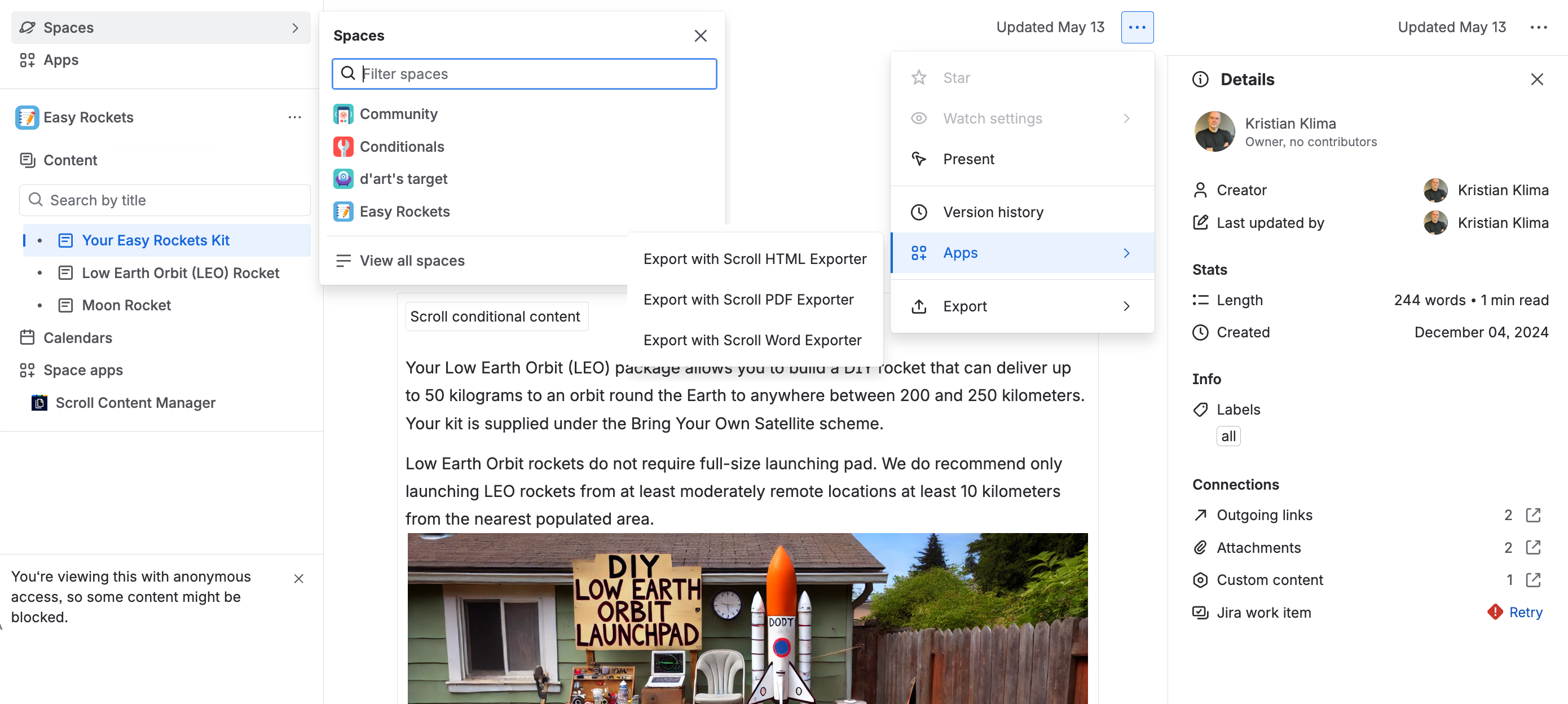
As you can see, many UI elements are exposed, including personal details which might be problematic in certain jurisdictions and within specific compliance regimes.
Crucially, no app that relies on anonymous access to a Confluence space can hide that.
Why Admins Fear Anonymous Access
The underlying infrastructure of Confluence Cloud is safe. But configuration and risk assessment is each team’s responsibility.
In this section, we’ll look into reasons why many Confluence admins are reluctant to allow anonymous access and often disable it at the site level.
Notes:
-
For clarity, we grouped the risks into logical units. In the real world, those risks are interconnected.
-
All risk factors mentioned in this section focus on View-only permission for anonymous access.
Data leak
Accidental data leak is one the main reasons admins are worried about anonymous access. We touched this in the Practical Downsides section. Admittedly, data leak is a universal issue, pretty much agnostic to the tool set that you’re using.
But the fact is that with anonymous access enabled in Confluence, you’re actively walking towards it. Even if your theme app allows you to exclude certain pages from the site that a theme app creates, the Confluence page itself will be live and publicly accessible in the underlying public Confluence space.
And let’s not forget that you’re sharing way more than just your content.
Exposing your Confluence site’s URL
Confluence cloud sites follow the standard nomenclature of companyname.atlassian.net. A potential attacker, or a lurker, may guess it but if anonymous access is disabled, they won’t see anything.
When anonymous access is enabled, they don’t have to guess. Your Confluence becomes a public facing website in its own right, whether you refined your content with a theme app or not.
You’re also showing your space key and page IDs.
Social engineering
Seeing full names of contributors and the page version history is a blueprint for a phishing campaign. Rather than sending a generic email, an attacker can compose a targeted plausible message that is based on the actual page content and the details from the page’s history.
Calendar visibility, and the option to add a calendar item in the public Confluence space, can be considered an open phishing invite.
Privacy
Publishing employees' public data on the internet without consent is a violation of the European Union’s GDPR (General Data Protection Regulation) and similar personal data protection laws. Showing who, when, and how, made updates on a specific Confluence page might also clash with the data minimization principle (see Article 5 and Article 25 of the GDPR) .
And let’s not forget that Confluence’s page history is pretty much endless.
During the research for this article, we explored a couple of public Confluence spaces with open anonymous access and, thanks to version history going back up to four years in some cases, we were able to identify former employees who have long left that company.
While the company has a legitimate interest in making that Confluence page available as a part of product documentation, the identity of the contributor is irrelevant. Claims of legitimate interest in displaying a former employee’s name publicly are unlikely to stand.
Yes, this is a question of a proper employee off-boarding policy and deactivation vs. deletion of users in Confluence. However, administrators must make decisions and take actions to prevent potential risks and consequences of human errors and inadequate processes, especially if they have no control over them.
For the record, I consented to have my name published on the website 🙂.
API vulnerability exploits
Imagine that a space owner (admin) decides to open the space to anonymous access. To prevent some pages from being displayed, they deploy page restriction. That means that specific users (person or an app) CAN access such pages in the public space when viewed under their login.
This opens the door to unauthorized access and privilege escalation exploits via API vulnerabilities or weaknesses. In such a case, an attacker might try to extract content from restricted pages mirroring an existing privilege of another user.
A compromised marketplace app in the public space might also provide a door to potential exploits.
Compliance & legal requirements
When it comes to compliance, legal requirements, and contractual obligations, Confluence admins have no choice – disabling anonymous access is mandatory. Again, a specific security standard such as SOC 2, ISO 27001, GDPR, or HIPAA doesn’t have to outlaw anonymous access to Confluence spaces as such. But admins and compliance officers must consider potential consequences of a possible, and thus preventable, human error.
Anonymous users leave no audit trail, which is a compliance nightmare because there is no
-
controlled access,
-
auditability of who accessed what
in case of accidental publishing.
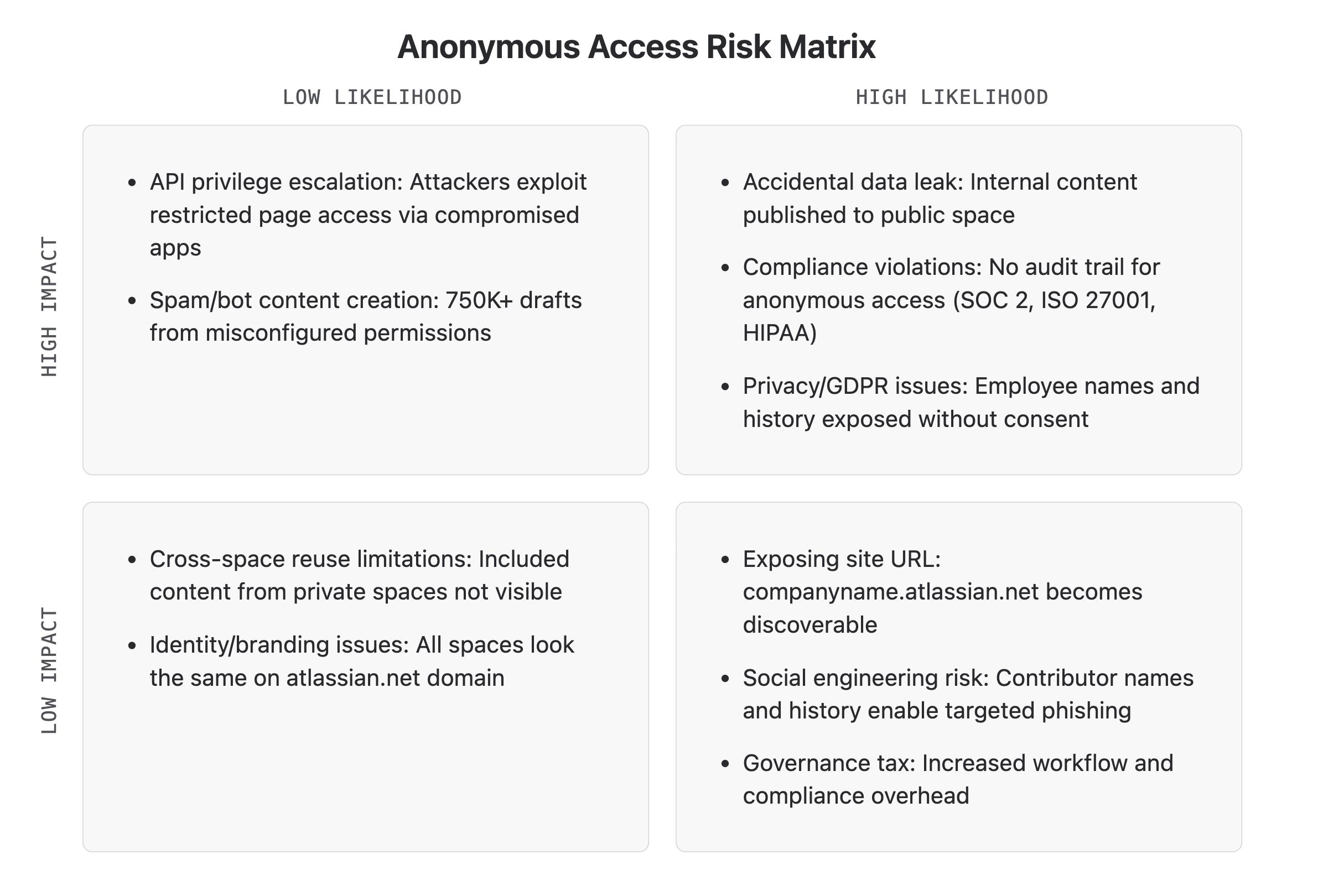
Anonymous access risks summary
The following chart offers a bird’s eye overview of risks' impact and likelihood associated with opening your Confluence content to anonymous access.
Blast Radius Architecture for Confluence Content
Blast radius control (data isolation) is an architectural strategy that limits the scope of damage if a security breach, process pipeline failure, or accidental publishing occurs. In layman terms, you want to segment information into protected zones.
In practical terms it means that teams should not be using Confluence as both the authoring environment and the content consumption layer.
Enabling anonymous access permissions does the exact opposite. Anything that you publish (save a page) – willingly or by mistake – drafts, internal specs, etc. is immediately live, indexable, and searchable. Even if you don’t publish it on your themed site. The separation requirement is not met because the source Confluence spaces are still public.
Solution?
Use an app that can publish Confluence content to a website without anonymous access enabled from any of the spaces.
How a Wrong Click Resulted in a Disaster
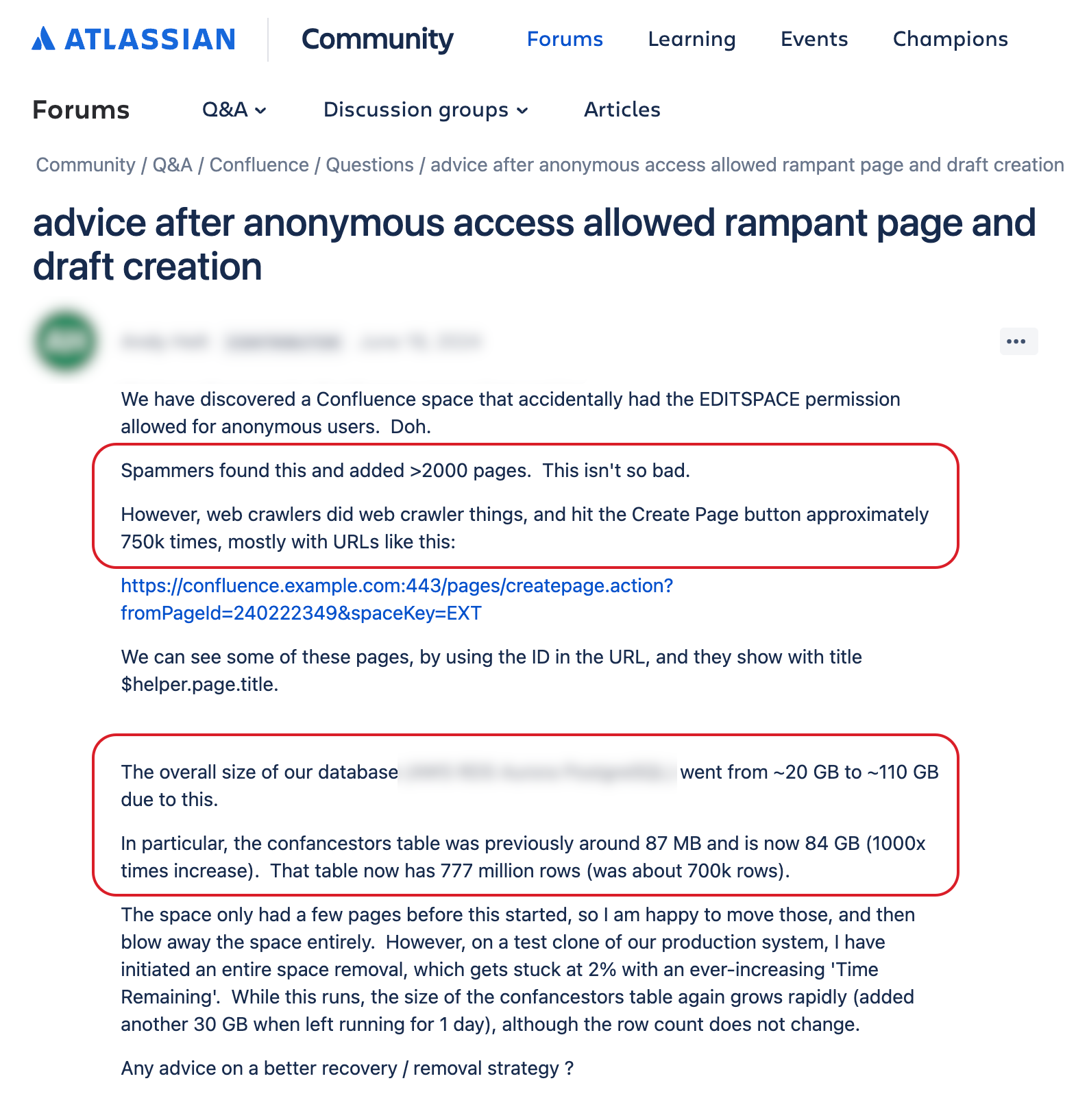
In the screenshot, you can see a real question that was posted on the Atlassian Community Confluence forum a couple of years ago.
Here’s what happened.
As a result of an accidental misclick in the permissions UI of a Confluence space with anonymous users access, anyone on the internet could suddenly create a new page. And by anyone, we mean everyone, spammers and bots alike.
-
Spammers created more than 2000 pages.
-
Bots hit the Create page button 750 THOUSAND times which resulted in an equal number of drafts and a massive headache for the entire team.
Use anonymous access cautiously. Or learn how to publish Confluence content without compromising your security.