
In this issue, we’re celebrating the 100th issue of our Weekly Dose of Confluence newsletter with you and look back to those two years.


100th Special Edition
When we started writing a weekly newsletter about Confluence two years ago, we couldn’t have imagined how Confluence would develop.
And how long you would continue reading our Confluence updates, tips, tricks, and news.
But here you are, reading the 100th edition of our Weekly Dose of Confluence.
We want to say: Thank you! For always being with us and discovering the latest Confluence news together. 🙏🏻
Let’s look back to those two years of sharing news and excitement and take a look at the milestones we achieved together.
Highlights from 100 Issues
Here are some facts:
-
The most popular newsletter was issue #31, where we showed you how to become a true “space gardener” by using Confluence automation to keep your spaces tidy and up-to-date. We walked you through setting up a simple, scheduled automation that finds inactive pages and notifies their owners.
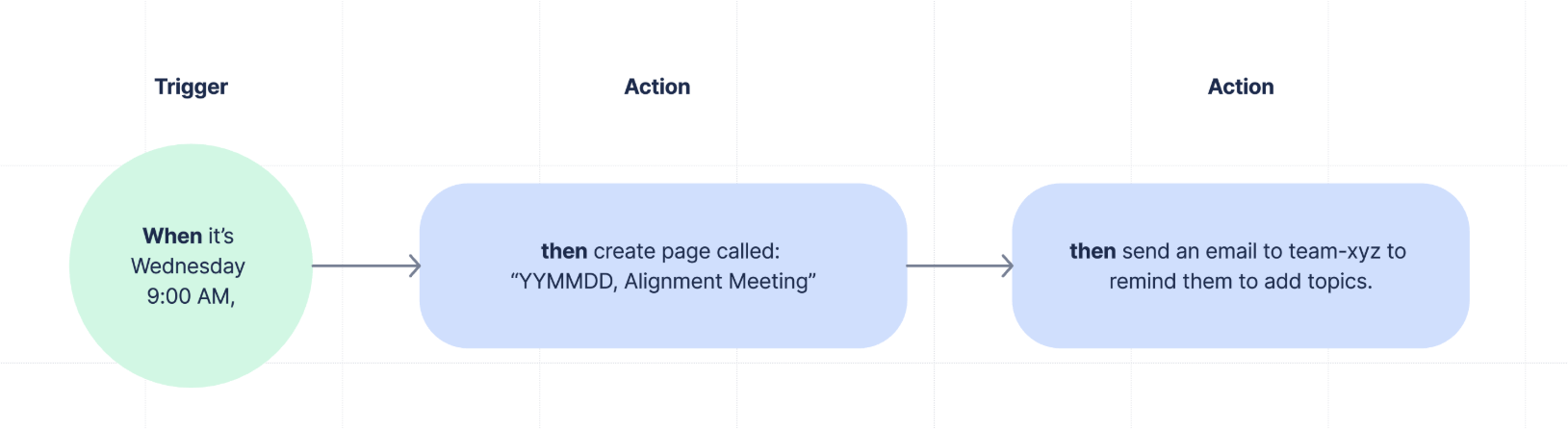
Read our article about Confluence automation.
-
The most popular issue by website traffic ever is #73: Stop Searching. Start Finding. Meet Rovo. In this edition, we walked you through a real-life example of using Rovo for a stakeholder update.
Other favorites of yours are what happens when you archive a Confluence page, the edition about how to better your blogs, and a guide on the Confluence presenter mode.
-
On average, we’re working 15 hours per week to bring the latest news, tips, and tricks right to your inbox.
-
Also, did you notice that we redesigned and restructured the whole newsletter this year? We wanted to bring a bit more color into your life. 🎨
Get Your Documentation Guide
This week, we also want to share something special. Something that we want to give back to the community, hoping it will help you to deliver better content, better documentation with Confluence.
For the last couple of months, we’ve been working on the Documentation Guide, a series of six articles that will help you to design your documentation strategy / information infrastructure and, establish a reliable documentation life cycle to ensure that your content is always up-to-date, relevant and nice to read. We cover Strategy, Planning, Authoring, Review, rules of Engagement with users, and Maintenance.
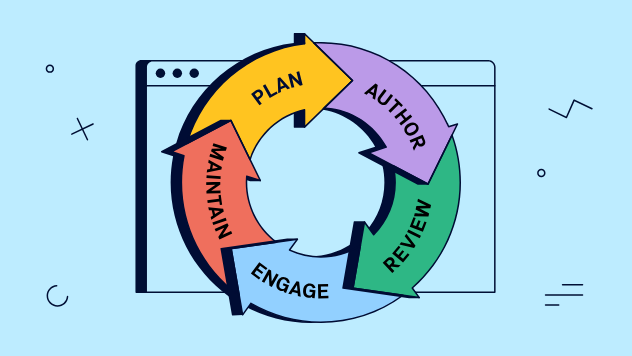
As a Weekly Dose of Confluence subscriber, you can sign up to be the first to know that the Documentation Guide is officially published.
It’s also a chance to provide an early feedback – we will select a couple of signees and give them access to the guide so they can provide feedback on this ‘beta’ version.
Our “Thank You”
To show how thankful we are for having you in our community, we’re giving away three special combo packs – each including a reflective bag, a T-shirt, a sticker pack, and a display wipe.
How can you participate?
-
Write a LinkedIn post explaining why you subscribed to this newsletter and enjoy reading it.
-
Link to https://www.k15t.com/rock-the-docs/news and
-
use the hashtag #wdoc100.
-
@-mention “K15t company”
-
Publish your post by November 18. We will announce the winners on LinkedIn on November 24.


Create With Rovo is Coming
Create with Rovo is now in beta, making it easier to turn ideas into polished Confluence pages, live docs, or whiteboards with just a prompt. While it won’t replace your expertise or team’s unique voice, it can help you get started faster and reduce blank page anxiety. As with any beta, expect a few rough edges, but it’s an exciting step forward for working smarter in Confluence.
New Shortcut for Exports
Atlassian just made a change that’s actually worth your attention. Starting this week, when you hit ⌘P (Mac) or Ctrl+P (Windows) on a Confluence page, you won’t get your browser’s print menu anymore. Instead, you’ll be whisked straight to Confluence’s Export PDF feature.
Benefit from Monthly Confluence Tips

Join our Monthly Dose of Confluence newsletter and discover smarter ways to work, publish, and collaborate in Confluence.


