

Hey there, this is your Weekly Dose of Confluence with the latest and most important Confluence news in 5 minutes. If you were forwarded this message, you can get the free weekly newsletter here.
In this article, we explore some common reasons why people aren't using Confluence to its fullest potential and also highlight the new ability to create Jira issues from Confluence tables.
Let's dive in!
Why NOT Confluence?
We love how much collaboration and productivity Confluence unlocks for teams. We’ve seen firsthand how even new team members using Confluence can contribute real value by the end of their first week on the job! We’re super into it.
That said, we’ve also encountered a few reasons why some people aren’t, in fact, into it—and, you know, they have some pretty legitimate concerns.
Let’s take a look at a few common objections we’ve heard in the past and share the solutions we’ve found for each:
🤔 The Name “Confluence” is Strange
Look, this one is completely valid for people encountering the app for the first time. Like, how should one pronounce it? Do you emphasize CON or FLU? And why does it have so many syllables?
If this is you, we see you. It’s a bit much at first, but the good news is you can pronounce it however you like. Even better, once it becomes part of your daily vocabulary, it’ll feel as natural as any other tool. Some companies even give it a nickname internally, like “Connie” or “the wiki”—but we actually recommend against this.
Why? Because if a new team member joins and searches for “Connie” in documentation or help articles, they won’t find anything useful. And you know we like it when people can find the knowledge they’re looking for!
🪞 It’s Ugly
Oof. This one was hard to write, but we’ve heard it, so let’s be honest with ourselves.
This sentiment is most common among teams using older versions of Confluence Server—some being quite old—or those using Confluence Data Center.
There’s no denying that while Confluence Cloud has seen consistent—mostly great—UI improvements, Confluence Data Center hasn’t received the same level of love and care. But, more often than not, when people complain about the UI, what they really mean is that the pages themselves don’t look great.
The good news? Any team can create beautiful pages.
Here’s how:
✔️ Put the most important information at the top
✔️ Use page sections for better readability
✔️ Incorporate elements and macros to visually break up content
✔️ Avoid long walls of text—break up lengthy pages into multiple, more digestible ones
With these simple improvements, your Confluence pages will feel loverly.
😑 Isn’t It Just an Intranet Site?
This one is more common than you might think. We’ve seen teams where people don’t even realize that they can edit content in Confluence. In fact, around 40% of users don’t even know you can add inline comments in Confluence.
And friends, this is no Confluence life we wish for anyone.
A Confluence site without collaboration is just an intranet. And what happens to traditional intranet sites? They go out of date fast.
To fix this, we recommend adding tasks to people’s first week onboarding plan that require them to add inline comments and edit content in Confluence.
Make these tasks meaningful, not just busy work, like:
💡 Write a short intro blog post
💡 Comment on the team page and share what you’re most excited to contribute
When people actively engage with Confluence from day one, they quickly realize its power and start using it to its full potential.
🫵 That’s NOT All…
These are just a few of the reasons some teams aren’t using Confluence to its fullest potential. But honestly, we’re sure you’ve encountered more.
So, tell us! Reply to this email with other issues you’ve run into, and we’ll tackle them. Seriously—real people are behind this newsletter, and we want to hear from you. 😁
Oh, and by the way—some people don’t use Confluence simply because they don’t know all the use cases it supports! If that’s the case, share this collection of use cases we’ve documented so far. It might just help:
Quick Jira Work Item Creation from Tables
Atlassian has introduced an improved way to create Jira work items directly from Confluence tables. You can now highlight text within a table to generate single or multiple Jira work items, with pre-filled summaries and descriptions right from Confluence. This really streamlines the transition from pre-planning in Confluence to planning the work in Jira. Annnnd, future updates will include additional mapping options, such as 'label' and 'due date', to further customize the integration.
Export Confluence Content on Letterhead
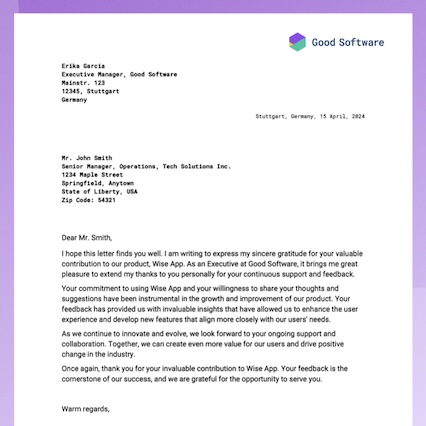
Did you know you can use Confluence to draft official letters and export them into beautifully designed, on-brand PDFs?
Just create your letter in Confluence, then use the new professional letterhead template with Scroll PDF Exporter to share it in style. 😎
Benefit from Monthly Confluence Tips

Join our Monthly Dose of Confluence newsletter and discover smarter ways to work, publish, and collaborate in Confluence.


